
Help Centre › Appointments & queues
Advanced vet scheduling
Rotations, alternate weeks, locums and split days: the working patterns that are not simply the same hours every week.
For a vet who works the same hours every week, enter them in Vet Availability. This page covers other patterns: rotations, a week on and a week off, and locums.
Vets who rotate#
For example, one week Dr Adams works mornings and Dr Bello afternoons, and the next week they swap. Set it up once and it repeats with no end date.
Home›Settings›Vet Availability
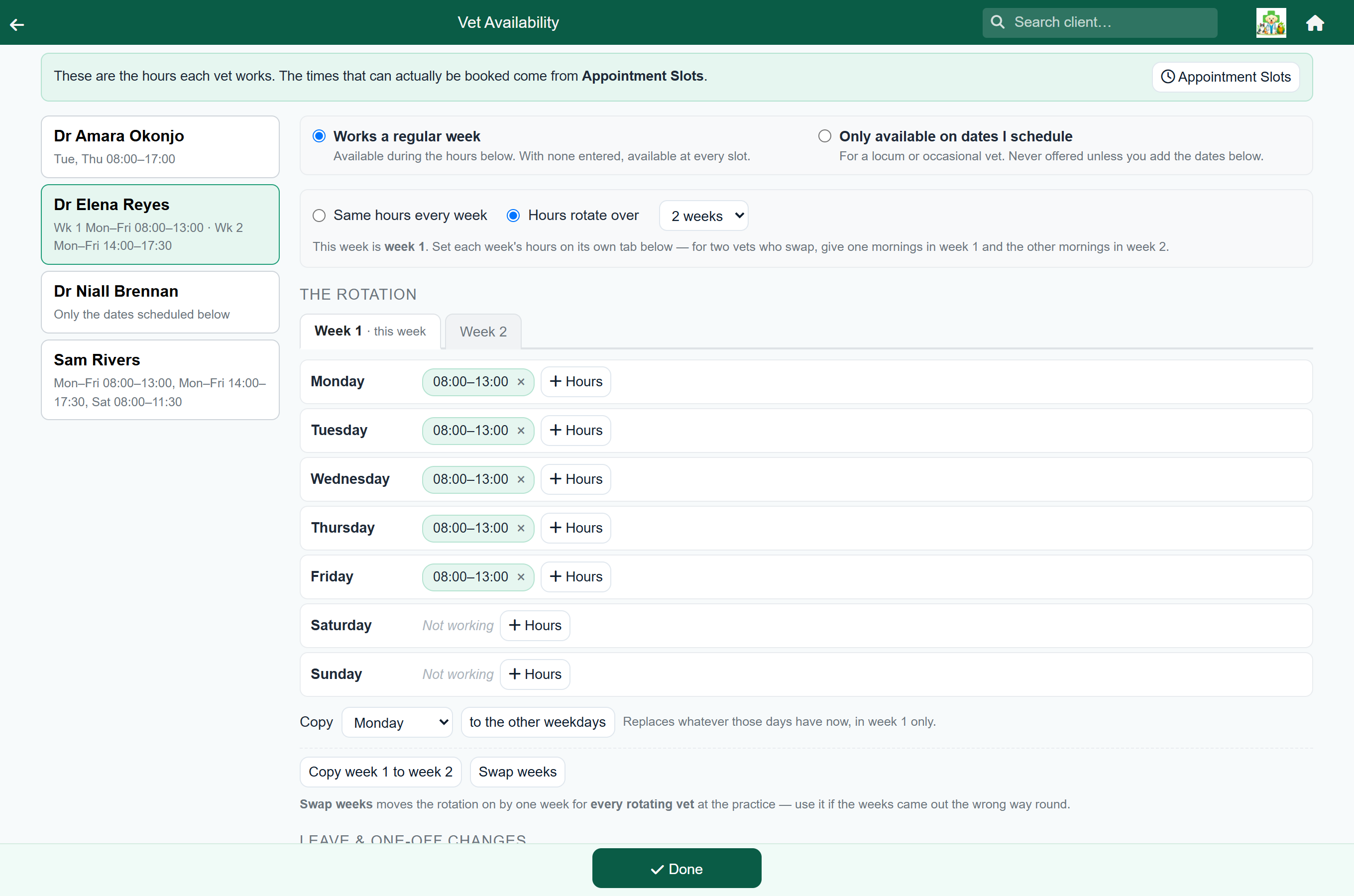
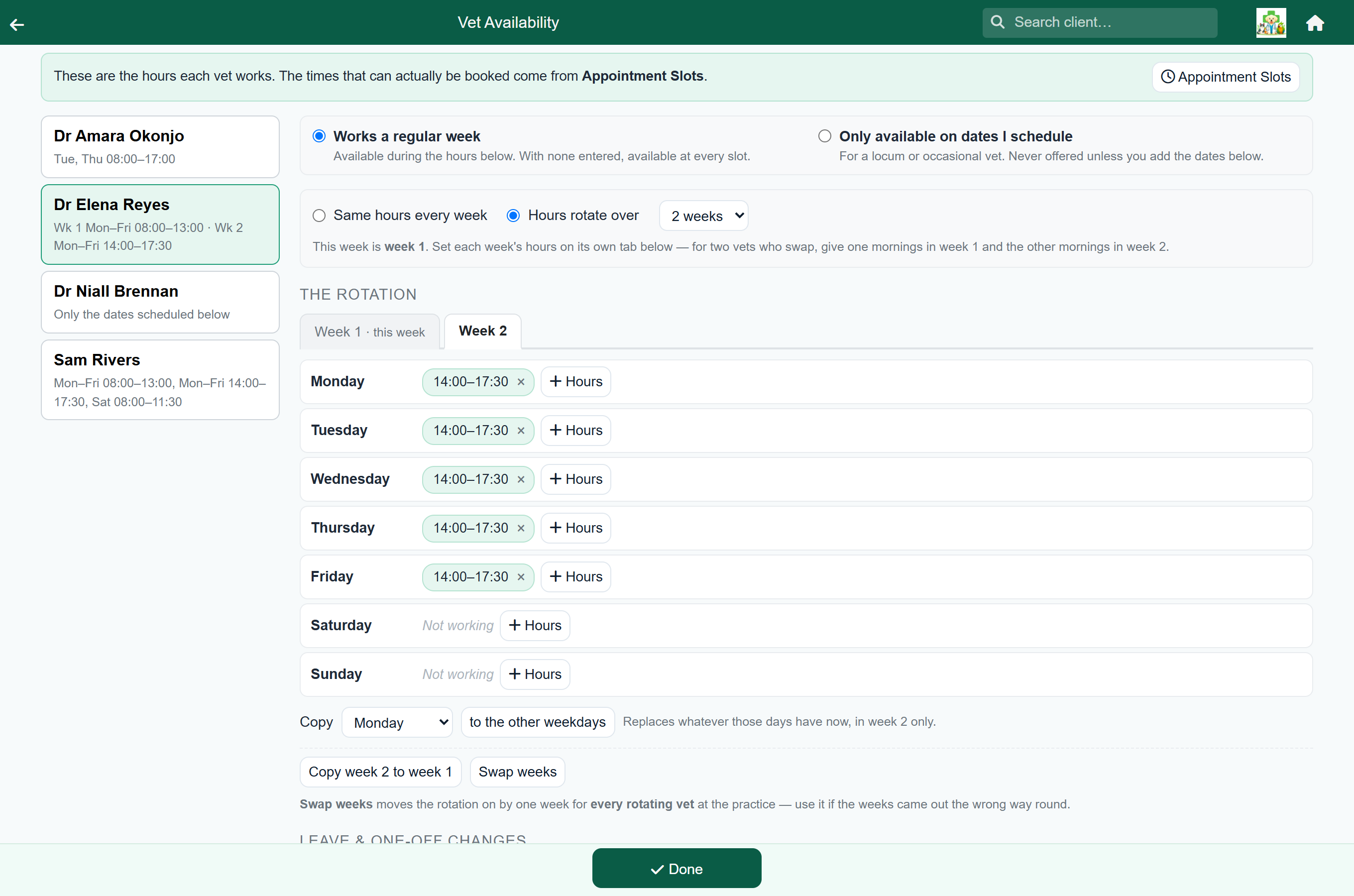
Pick the vet, then change Same hours every week to Hours rotate over and choose the number of weeks. A tab appears for each week, and you enter each week's hours on its tab.
To set up the swap:
- On Dr Adams, choose Hours rotate over 2 weeks.
- On the Week 1 tab, add the morning hours to one day, then use Copy to copy them to the other weekdays.
- Press Copy week 1 to week 2. The screen switches to week 2 with the same hours.
- Change them to the afternoon hours, again one day and then Copy.
- Set up Dr Bello the other way round: afternoons in week 1, mornings in week 2.
A week on, a week off#
For a vet who works every other week, choose a two-week rotation, enter their hours on the Week 1 tab, and leave Week 2 empty (every day shows Not working).
In their off week, reception sees a note saying which week it is:
"Dr Adams is not on the rota this Monday: this is week 2 of 2. They work Mondays in week 1."
Hours that do not rotate#
A rotating vet may also have fixed hours, such as a Saturday morning clinic every week.
When you add those hours, tick Every week. They then show on every tab, greyed out and labelled every week, and cannot be changed on a single tab.
Rotations longer than a fortnight#
A rotation can run over two, three or four weeks, for example mornings, afternoons, then a week off, or a Saturday once a month.
It works the same way as a two-week rotation, with more tabs. Copy copies within the tab you are on, and buttons such as Copy week 1 to week 3 copy a whole week to another.
When the weeks come out the wrong way round#
If the whole rotation is one week out (for example, this week FastVet has Dr Adams on afternoons when she is on mornings), press Swap weeks. The rotation moves on by one week.
Locums and occasional vets#
A locum has no weekly pattern. Switch them to Only available on dates I schedule and add the days they are in.
| Setting | What it means |
|---|---|
| Works a regular week | The hours entered apply. With no hours entered, the vet is available at every slot. |
| Only available on dates I schedule | Never offered except on dates you add. For a locum, a visiting specialist, or a semi-retired partner. |
Add their dates under Leave & one-off changes with Add an extra session.
Leave, courses and one-off changes#
Dated changes under the week grid override a rotation:
- Leave or a block takes the vet out on that date, whichever week of the rotation it falls in.
- An extra session puts them in on that date, including in a week they would normally be off.
Reception sees the reason you type, so a specific reason such as "CPD: small animal dentistry" is more useful than "leave".
Changing or undoing a rotation#
- Switching a vet back to Same hours every week keeps all the hours you entered; they then apply in every week.
- Turning a rotation on keeps the hours already entered. They apply in every week until you move them onto separate tabs.
- Copy and Copy week 1 to week 2 only change the week they name.
Patterns FastVet cannot describe#
Rotations are counted in whole weeks starting on a Monday. FastVet cannot describe:
- Cycles that are not whole weeks, such as four days on and four days off, or a ten-day rota.
- Rotas longer than four weeks.
- Rotations that skip public holidays rather than running straight through them.
For these, give the vet ordinary weekly hours, or a rotation that is right most of the time, and use Leave & one-off changes for the dates that differ.