
Help Centre › Money
Returns and credit notes
Take part of an invoice back, credit the client for it, and either sell them the replacement or hand the money over.
A client bought two Bravecto and needs the bigger size. Another opened a bag of food, found it was the wrong one, and brought it back unopened. Neither of those is a mistake on your part and neither cancels the visit, so reversing the whole invoice is the wrong tool: it would unpick the consultation as well as the one item that came back.
A credit note credits part of a finished invoice. The original invoice stays exactly as it was, and a separate numbered document says what came back and what the client is owed for it.
Credit note or reversal#
These are two different things and picking the wrong one is the most common mistake here.
| Use a credit note | Reverse the invoice |
|---|---|
| Some of what was billed came back, and the rest stands. | The whole thing should never have been billed. |
| The invoice keeps its number and its figures. A new CN document records the credit. | The charge itself is marked reversed and a matching credit is added. |
| Only sales and consultations, including dispenses. | Sales, consultations, stays and grooms. |
| Records a reason, which the Credit notes report shows. | Records no reason. |
Where to start a return#
Two ways in, depending on what you know:
- From the client. Return on Client Details, in the row of buttons under their name, beside Purchases. This lists everything they bought recently, so nobody has to go looking for the invoice first. This is the one you want with somebody at the counter holding a bag.
- From one invoice. Return on the invoice's own row on the client's Statement. The screen then opens with just that invoice on it.
Client Details›Return
Either way the credit is tied to one invoice, because a credit note corrects exactly one. Ticking an item on a second invoice starts again there rather than mixing the two.
Choosing what is coming back#
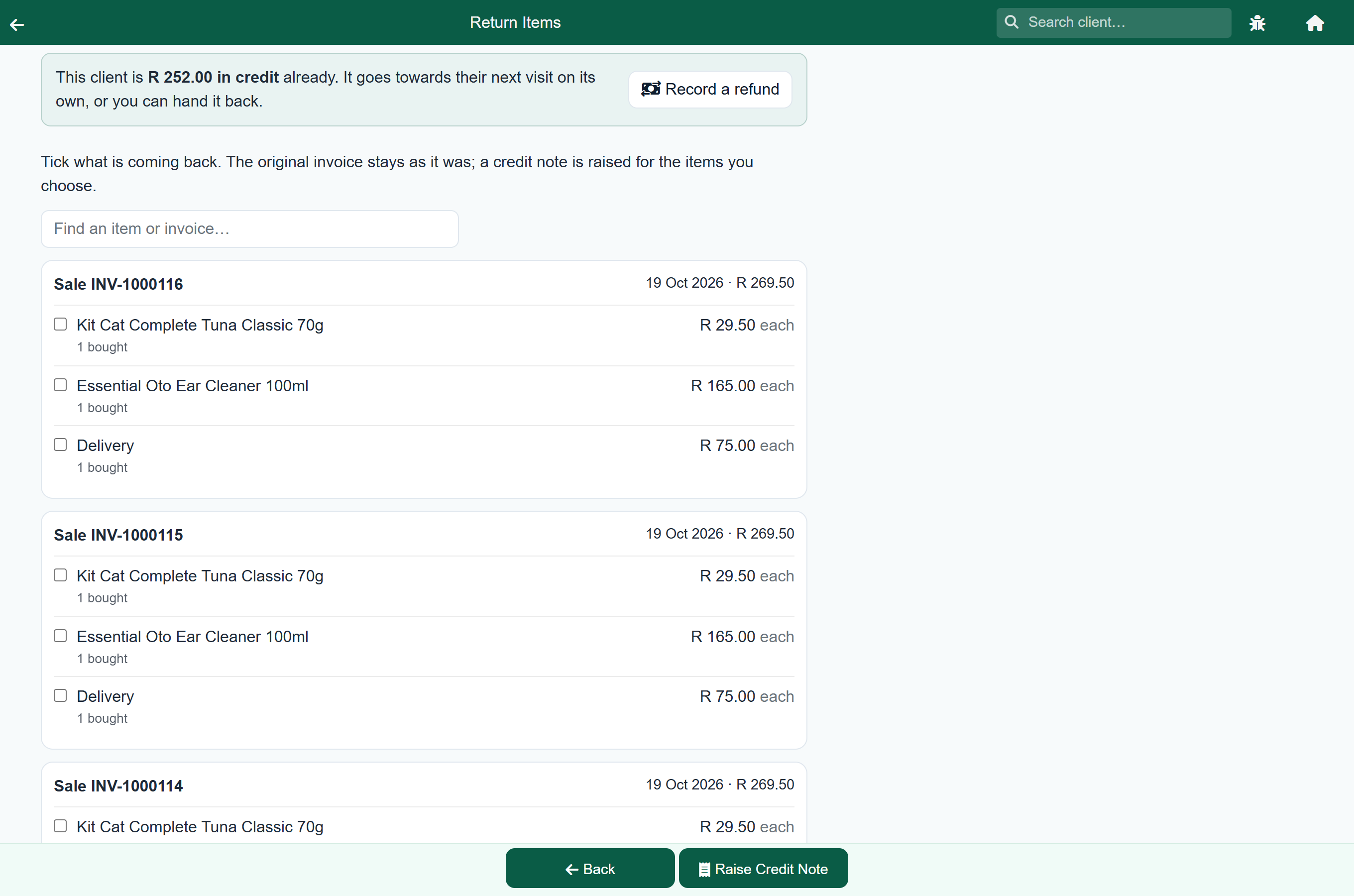
The screen lists the client's finished sales and consultations from the last 120 days that still have something left to credit, newest first, with a box to search by item, invoice number or patient.
- Tick the items that came back. The invoice they belong to lights up and the others dim.
- Set How many if only some of a line came back. A line of two Bravecto will credit one.
- Leave Put back into stock ticked for goods that are fit to sell again, and clear it for anything damaged or opened. It is only offered for items that came out of stock in the first place.
- Choose a Reason in the panel at the top.
- Press Raise Credit Note.
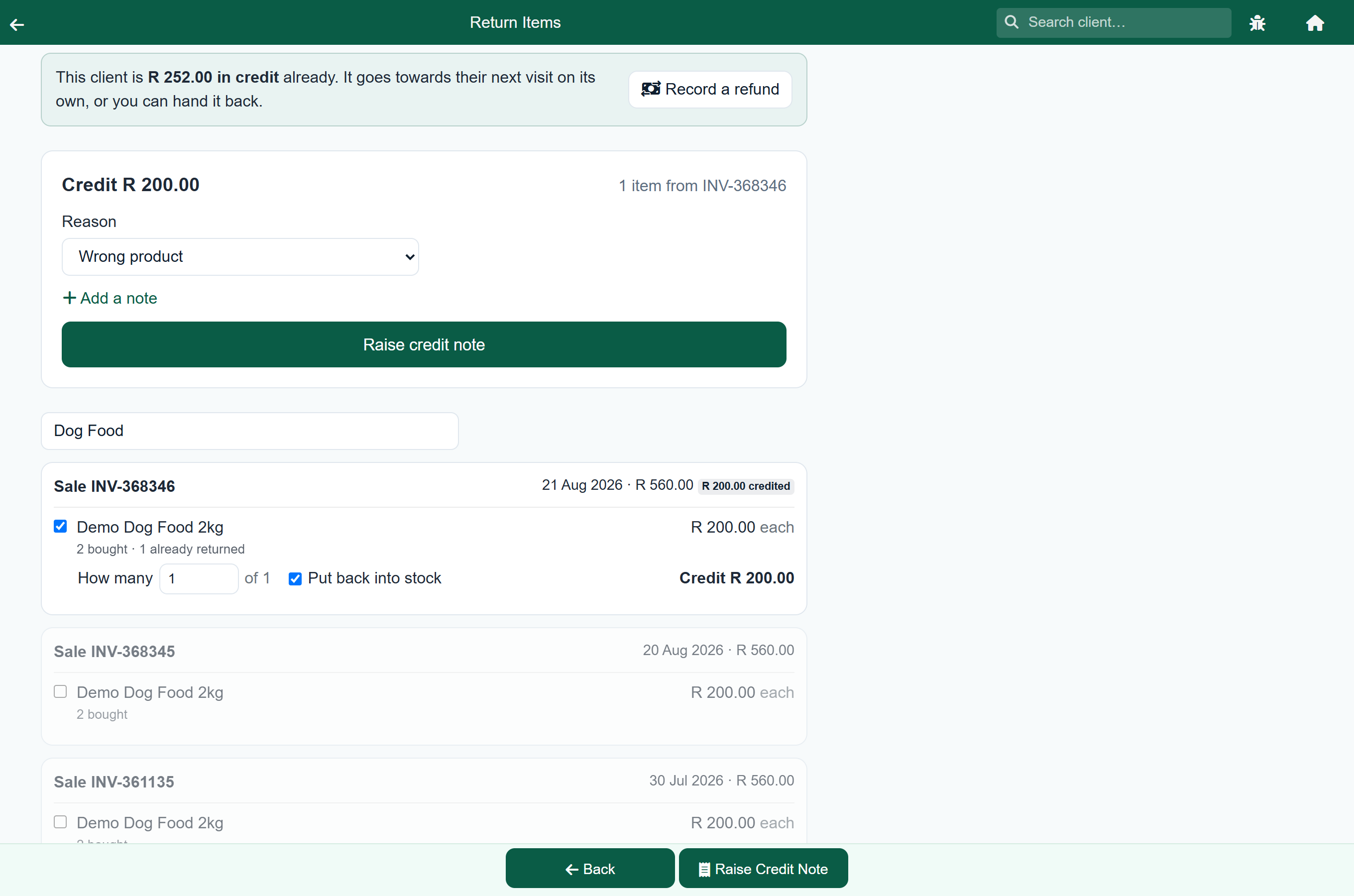
If something is missing, pressing Raise Credit Note says what and takes you to it rather than doing nothing.
What can be credited, and for how much#
| Offered | Not offered |
|---|---|
| Billed lines on a finished sale, consultation or dispense | An invoice that has been reversed, which is already void |
| A protocol, credited whole | A protocol's parts, which are billed through the protocol |
| Items already part credited, for whatever is left | An item already credited in full |
| Lines with no value: the consult-type line, a discount line, the rounding |
A discount is honoured. Where the invoice carried a whole-invoice discount or cash rounding, the client paid less than the lines add up to, so each item credits at what they actually paid for it rather than at list price. The screen says so on any invoice where it applies.
Nothing can be credited twice. What earlier credit notes already took is subtracted, so each line offers only what is left, and an invoice can never be credited past what it charged.
Giving the client their credit note#
Raising the credit note opens a screen like the one after an invoice is finished, because it is the same moment: the client is standing there and needs their copy.
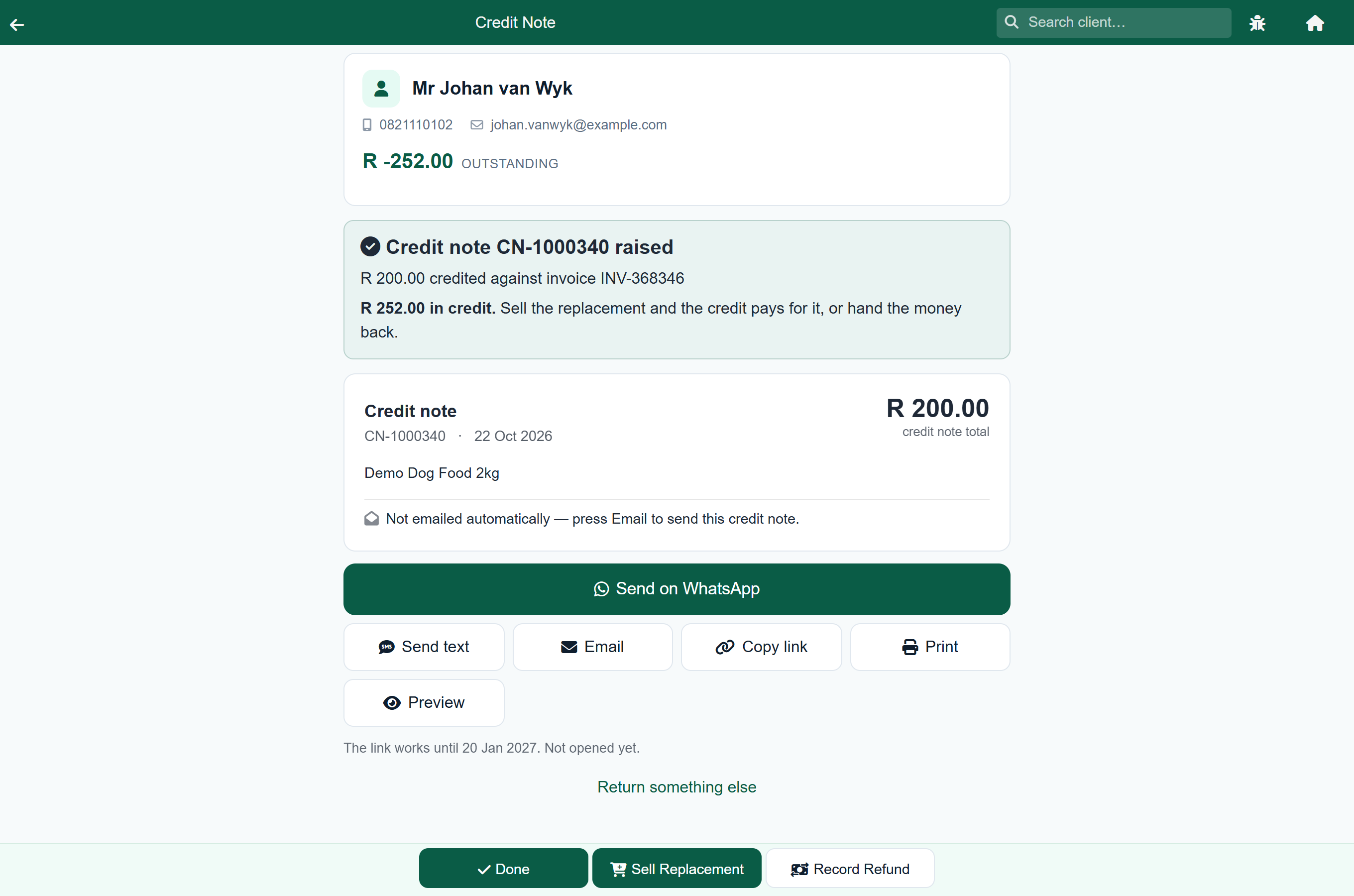
- WhatsApp sends them a link to the document. It opens your own WhatsApp with the message ready, so you see the client and the text before it goes.
- Preview opens the client's copy exactly as they will see it on their phone, before you send anything.
- Email sends it to the address on their record, and says whether it went.
- Print gives you the document itself, for handing over the counter.
- Copy link puts the link on your clipboard, for whatever your practice actually uses.
The credit note is numbered CN- and prints on your practice's invoice letterhead, with the invoice it corrects named on it. It is a tax document: keep it with your invoices.
The swap, or the money#
A credit note puts the money on the client's account. What happens next is one of two things, and both are on the credit note screen.
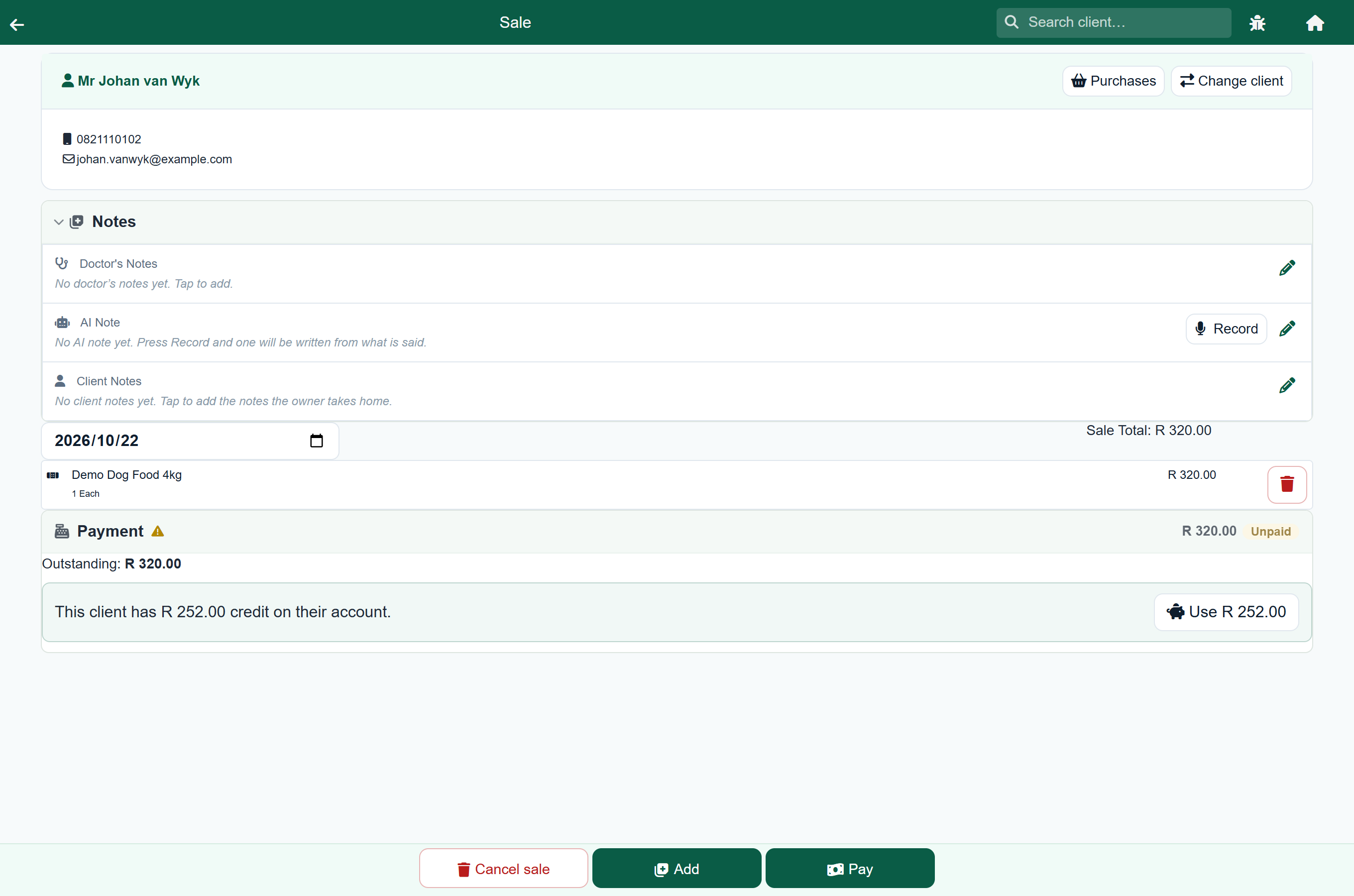
Sell Replacement opens a till sale on this client. Add the replacement, and the payment panel offers their credit: Use R 252.00 takes it off the sale in one tap, and anything still owing is taken in cash or on a card as usual. A bigger bag that costs more than the one returned collects only the difference.
Record Refund hands the money back. It opens a screen of its own with the amount to refund already filled in, three buttons for how it went (cash, card or EFT), and a place for a reference.
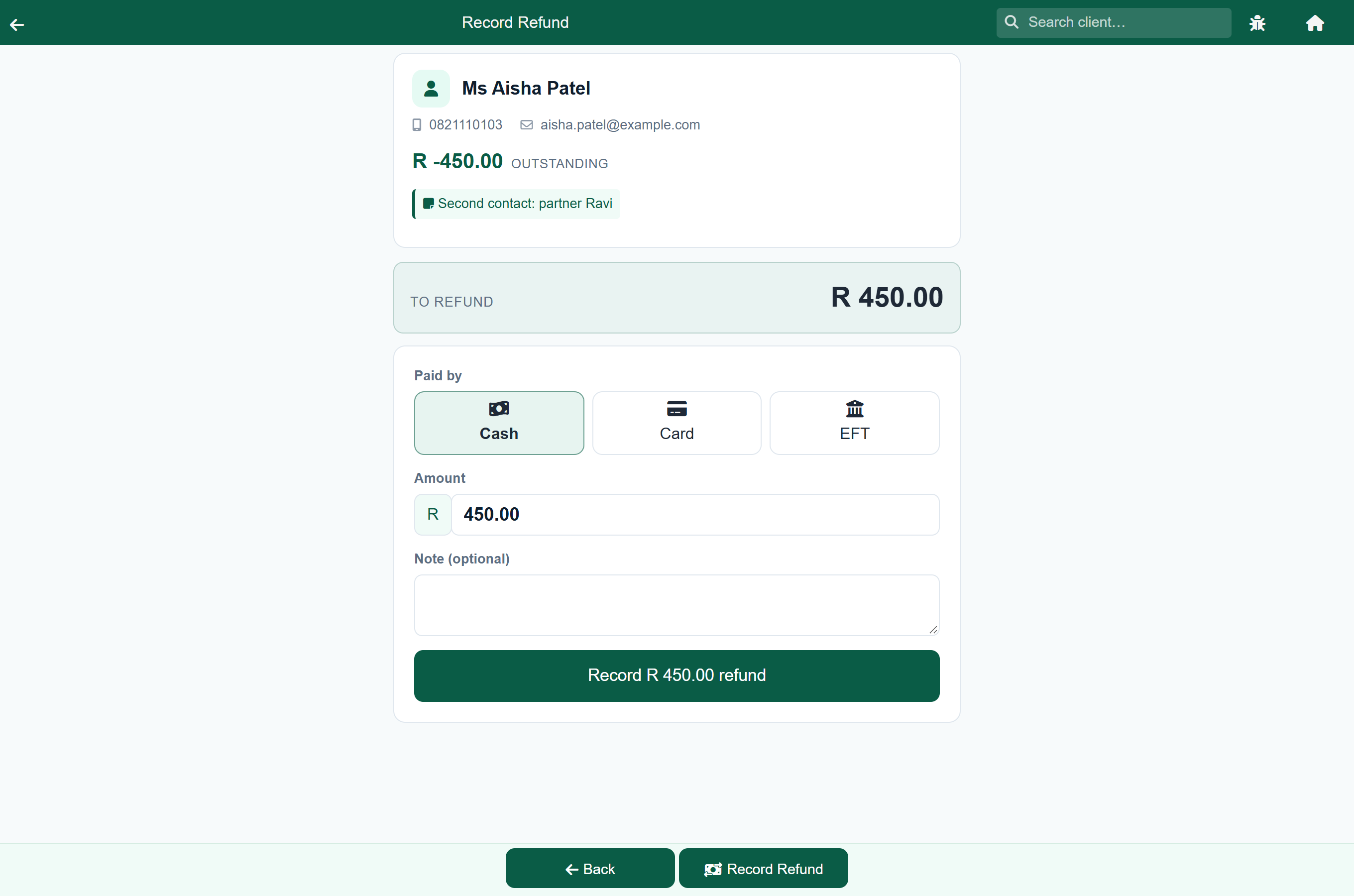
A client who comes back days later for money they were credited earlier does not need a new return. Open Return on their record and the screen offers Record a refund at the top, because it can see they are already in credit.
Returns on a counter sale#
A counter sale is charged to the account your practice keeps for walk-in trade, which belongs to nobody. Credit cannot be left sitting on it, because the next walk-in would silently spend it.
So when you credit a counter sale, FastVet asks Refunded at the till by and will not raise the credit note without an answer. The money goes straight back, the counter account stays at zero, and the credit note records how the refund was paid.
What else a return undoes#
A credit note is not only a credit on the account. Three other things follow it, without anybody having to remember them:
| Stock | Items you ticked Put back into stock go back into the store, in the stock item's own unit, against the same batch they went out on. |
| Loyalty points | The points the returned items earned are taken back. Returning part of an invoice takes that share of its points, so the client keeps the points on whatever they kept. See Loyalty. |
| Commission | A vet's commission on the returned items comes off. On a visit whose commission has not been paid yet it simply is not claimed; where it has already been paid out, the next run shows a correction for the returned share. See Commission. |
Where returns and refunds show up#
- Credit notes lists every credit raised in a period: credit notes with their reason, and whole invoices reversed. Run it monthly, and any time the credits look higher than usual.
- Payments received (detail) shows a refund as a negative amount, because it is money going out of the till.
- The client's Statement shows the credit note as its own row, with buttons to print or email it again.
- The day's takings count a refund as money out, so the figure you reconcile against the drawer already allows for it.
A credit note is VAT-bearing: it credits the VAT on the returned items as well as the goods, so your VAT return follows it without anything further being done.