
Help Centre › Clinical care
Vaccinations
Keep each patient's vaccination history, with the batch that went in, when the next dose is due and a reminder to the owner, recorded automatically from the line you already bill.
A vaccination record answers the questions an invoice cannot: what is this patient protected against, when is the next dose due, which batch went in, and who gave it. You do not keep it by hand. Link a price list item to a vaccine type once, and every dose you bill on that item is recorded against the patient by itself.
| Where | What it does |
|---|---|
| Settings, Vaccine Types | Sets up what your patients are tracked against, and the schedule each one follows. |
| The price list item | Links the thing you charge for to the thing it protects against. This is what turns it into a vaccine. |
| A consultation line | Takes the batch from the lot, and records the dose when you finish the invoice. |
| The patient's Vaccinations screen | The history, where it stands, and the printable record card. |
| Recorded elsewhere | A dose from another practice, typed off the owner's card. |
| Reminders | Tells the owner before the next dose falls due. |
| The consultation screen | Says what the patient in front of you is overdue for, above the invoice. |
Set up your vaccine types#
Settings›Vaccine Types›Add a vaccine type
A vaccine type is what the patient is protected against, not the product you buy. Name them the way you already book them: Rabies, 5-in-1, Snuffle. A combination shot is one entry, not four.
Naming it this way is the whole point. If you switch from one brand to another next year, every patient keeps their history and their due dates, because the record follows the protection rather than the product.
You do not have to type them in. Your practice already has the usual ones, and while the list is short the screen offers you Start from the standard set: dog and cat, plus horses and herd lines when your patient book has that work in it. It fills in the published minimum ages, course lengths and booster intervals, and you can change any of them afterwards.
| Field | What it means |
|---|---|
| Name | What you call it. This is what prints on the record card. |
| Species | Sorts the picker so the patient's own species comes first, and never hides anything from it: species is typed free-hand and spellings vary, and a vet must always be able to record the dose they just gave. It does decide which patients are shown as missing this protection on their clinical history, so a dog is not asked about the cat vaccines. Leave it blank for something you give to anything. |
| Core vaccine | Marks the ones you consider essential rather than optional. |
| This is rabies | Marks the one with legal standing, which is the one owners ask for a certificate for. |
| Doses in the initial course | How many doses a young animal needs before it is covered. Leave blank if there is no course. |
| Days between those doses | The gap within that course, usually 21 to 28 days. |
| Days to the booster | The follow-up after the course finishes. 182 days is 26 weeks, and that is the default. |
| Days between boosters after that | The steady interval once the patient is settled: 365 for a yearly vaccine, 1095 for a three-yearly one. Leave it blank for something you give only once. |
| Minimum age in weeks | FastVet warns you below this age. It never stops you. |
| Usual route and Usual site | Filled in on the line for you, so you confirm rather than type. |
Link the price list item#
Price List›the item›When this item is billed
Open the item you charge for, tick Record the vaccination under When this item is billed, and choose what it protects against. The list of protections appears as soon as you tick it.
It works whether the item is filed under Procedure, Treatment or Materials, so you do not have to move anything in your price list to use this.
Give a vaccination#
Consultation›Add›the vaccine
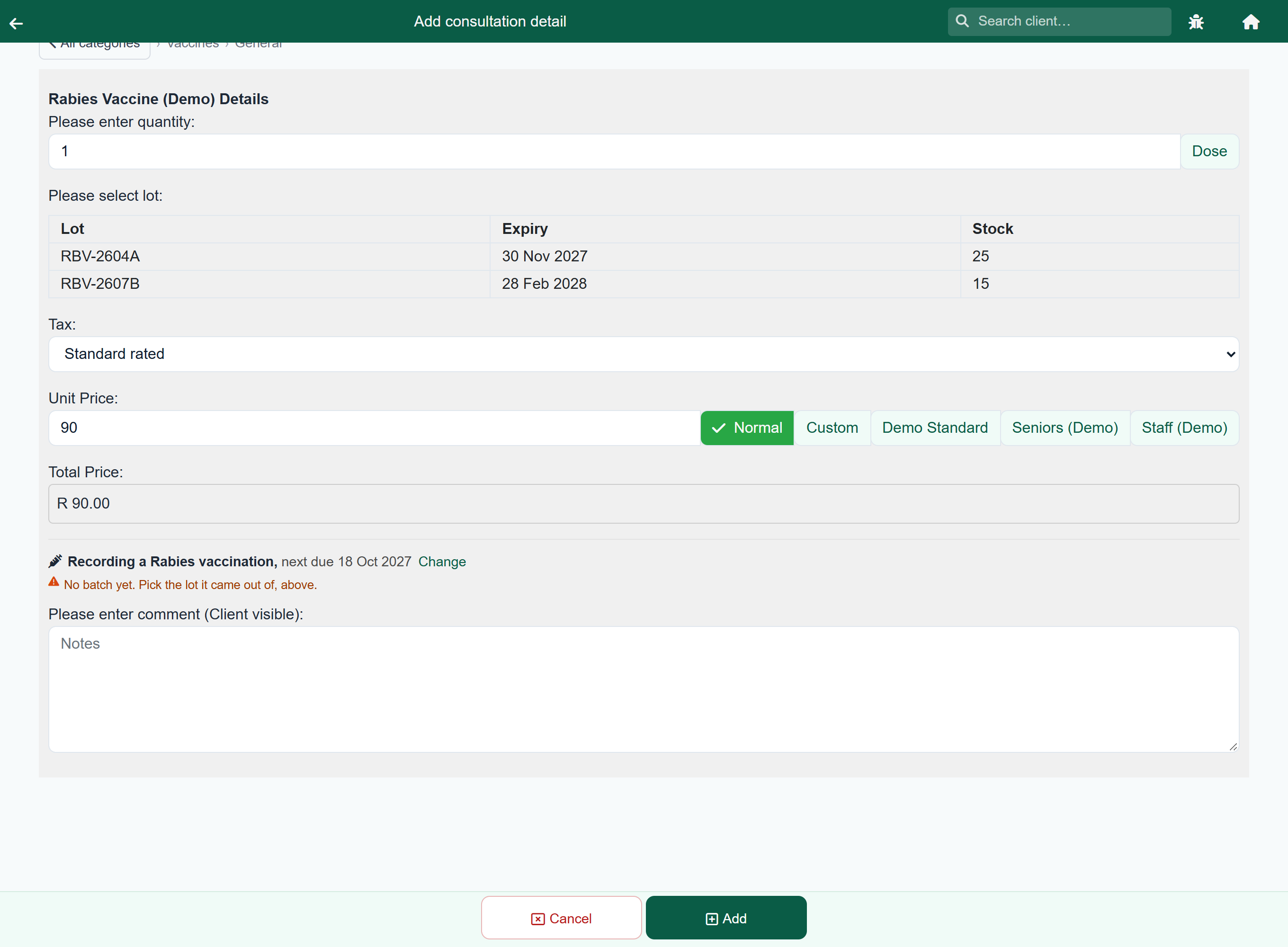
Add the vaccine to the consultation exactly as you would any other item. A panel appears on the line saying what will be recorded and when the next dose falls due.
- Pick the vaccine and set the quantity as usual.
- Choose the lot it came out of. That is the batch: the lot number and its expiry are what go onto the record. Where there is only one batch on the shelf it is taken for you.
- Finish the invoice as usual. The dose is recorded then.
There is nowhere to type a batch number on a consultation: the lot is the batch.
Everything else is filled in for you from the vaccine type: the route, the site, which dose of the course this is, and the date the next one is due. Press Change only when you want something different.
A vaccine inside a protocol is recorded the same way, but nothing asks you for the lot while the protocol is being added. To get the batch onto the record, tap the vaccine line on the consultation afterwards and choose the lot there. The dose is recorded either way; without the lot, the card simply cannot say which batch it came from.
The patient's record#
Client›the patient›Vaccinations
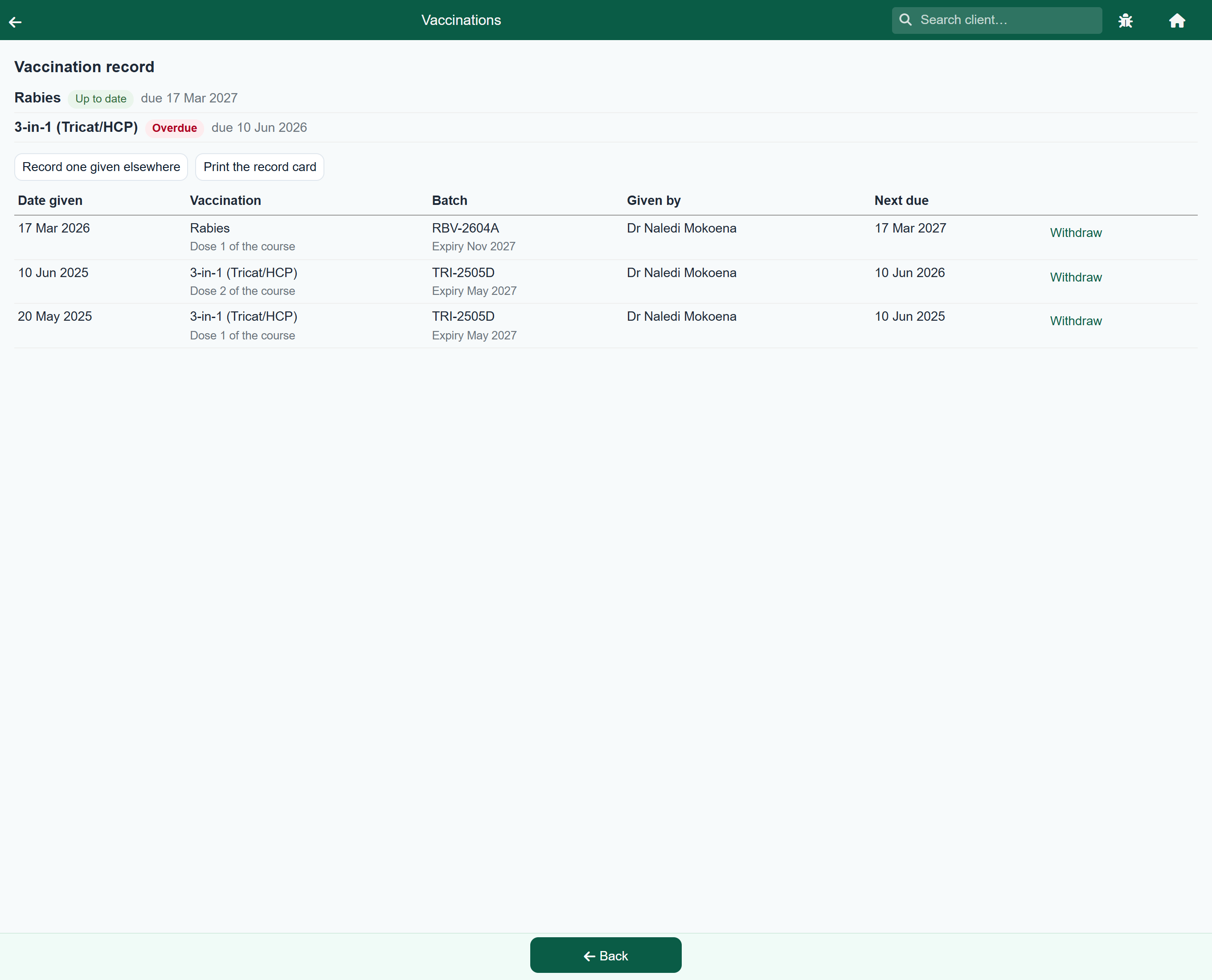
The screen opens with where the patient stands, one line per protection: up to date, due now, or overdue. Underneath is every dose it has had, newest first, with the batch and who gave it.
| It says | Which means |
|---|---|
| Up to date | The next dose is still in the future. |
| Due now | The due date has arrived, or passed within your grace period. |
| Overdue | Past the due date by more than your grace period. |
| No further dose | Nothing more is scheduled, because the vaccine type has no repeating interval. |
Print the record card produces the PDF you hand an owner: the patient, its microchip number where you have one, and every dose with its batch and its next due date.
A dose given somewhere else#
Vaccinations›Record one given elsewhere
A patient that arrives with an owner's card from another practice is not due again today, and the record has to know that. Press Record one given elsewhere, choose the vaccine type and the date it was given, and add the batch number if the card shows one. This is the one place a batch is typed, because a dose somebody else gave never came off your shelf.
It counts towards the series exactly as a dose you gave would, so the next due date is worked out from it. Nothing is charged and no stock moves.
Reminders#
When a dose is recorded, FastVet raises a reminder for the next one, dated before it falls due so the owner has time to book. It goes out with your other reminders, and it appears on the follow-up list on that day, marked with a syringe.
Nobody has to remember to go back for it. A notice nobody has dealt with stays on Outstanding, oldest first, until somebody marks it done.
| Setting | What it does |
|---|---|
| Send vaccination reminders | Turn this off to keep the records and the due dates without chasing anybody. |
| Days before the due date | How far ahead the reminder is raised. Fourteen days is the default. |
| Days before a patient is overdue | The grace period between falling due and being called overdue. Fourteen days is the default, so the overdue list stays short enough to act on. |