Help Centre › Appointments & queues
Queues
The live picture of who is waiting: for a vet, for payment, for a groom, or for a call back.
Queues pass work between people. Reception puts a patient on a queue, a vet picks them up, and finishing the visit moves them on to the payment queue. The counts on the home screen come from these queues.
How the queues fit together#
There are several queues, but they are steps along one road. A patient is on only one of them at a time, and moves along as the work gets done.
| A patient who is | Goes |
|---|---|
| Booked in | Booking › Weigh In › consult queue › Done › payment queue › paid |
| A walk-in | New Consultation, or Walk In on the booking list › consult queue › Done › payment queue › paid |
| Staying in hospital | Admit › hospital patients, one day sheet per day › Discharge › payment queue › paid |
| Buying over the counter | A cash sale, paid on the spot, so a finished one never reaches the payment queue |
The step that catches people out is the one in the middle. The charge goes on the client's account the moment the vet presses Done, or the moment a patient is discharged, and it stays there whatever happens afterwards. The payment queue does not hold the bill. It reads the accounts: every invoice that is still unpaid is on it, and it drops off by itself once it is paid.
Putting a patient on a queue#
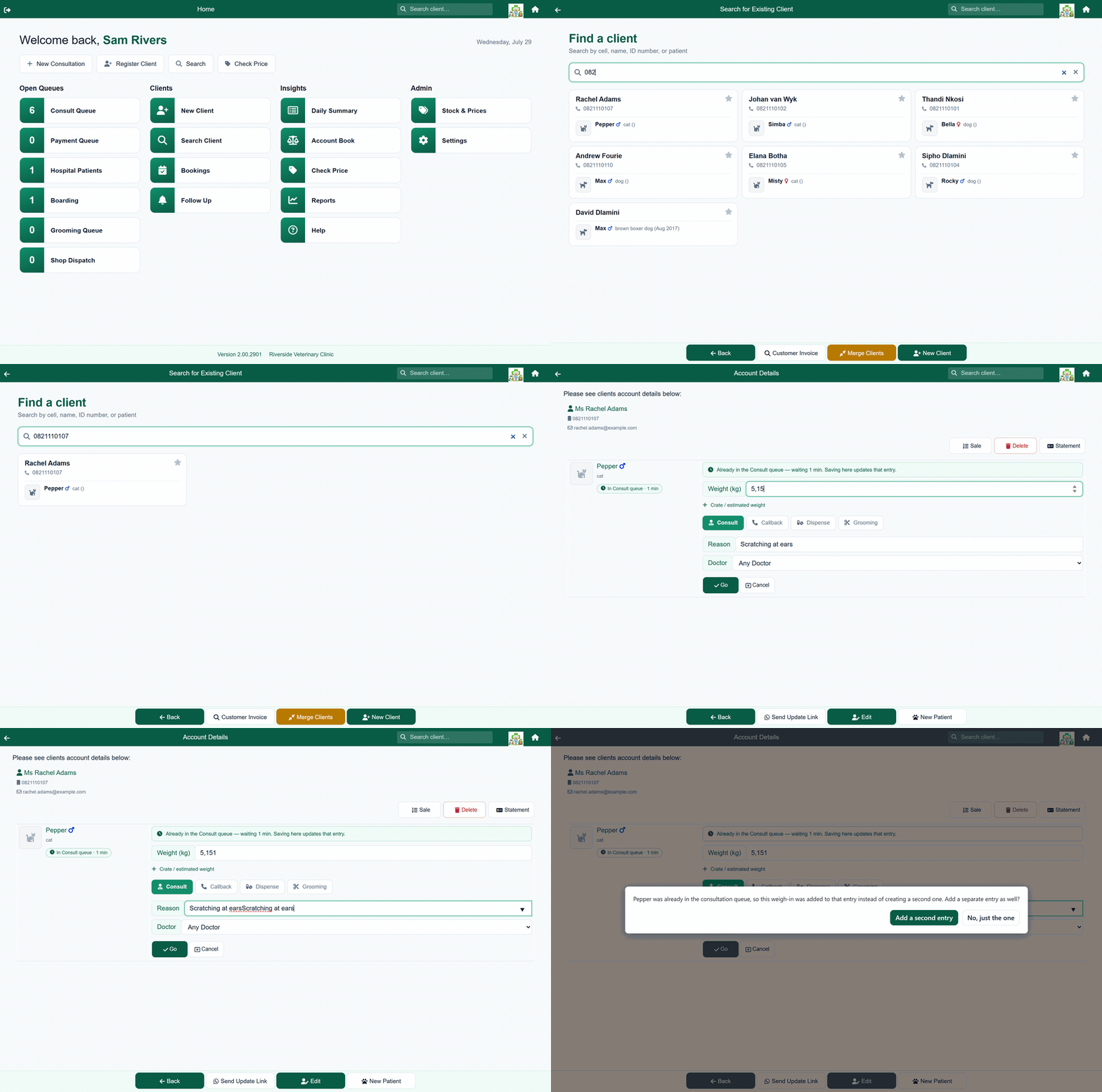
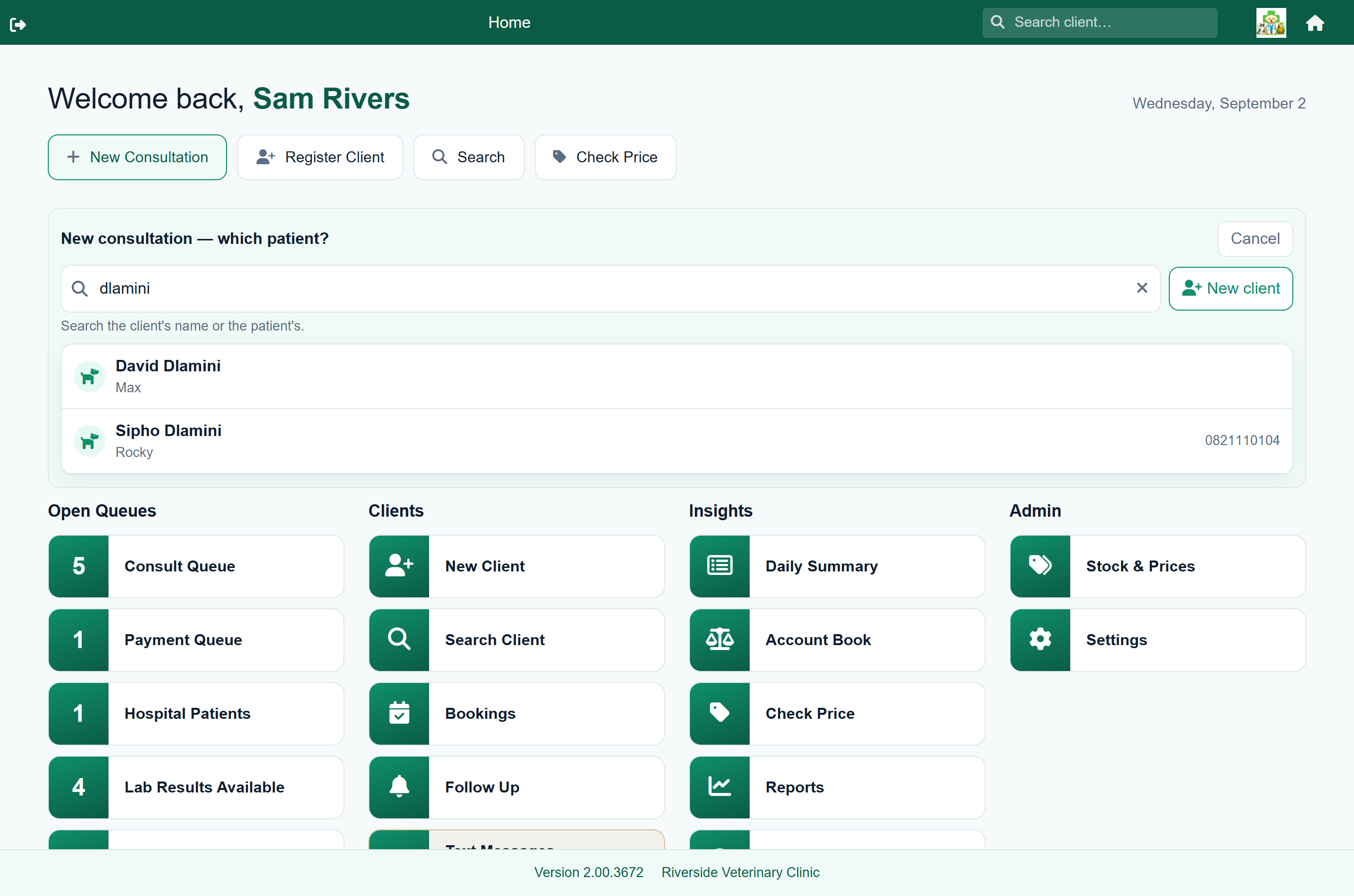
- From Home choose New Consultation. A search box opens on the home screen.
- Search by the client's name, cell number or the patient's name, and tap them. If the client has more than one patient, you are asked which.
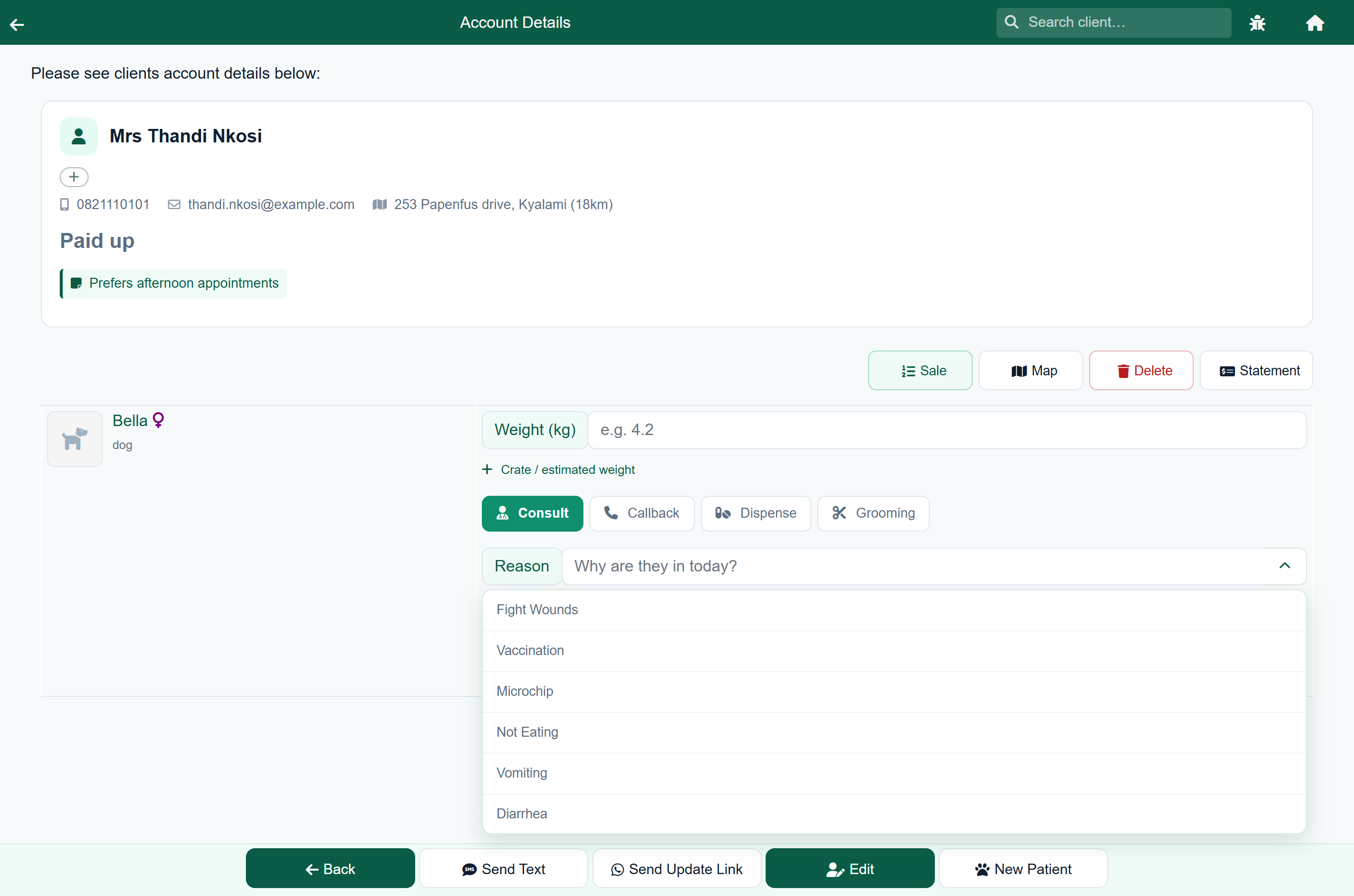
- Their account opens with the queue form on the patient. Enter the weight if you have it. Crate / estimated weight adds boxes for a weight taken in a carrier or an estimate.
- Choose why they are here: Consult, Callback, Dispense or Grooming.
- Give the reason. Tap the arrow at the end of the box for your practice's standard reasons, or start typing and the list narrows to what matches. You are not held to the list: whatever you type is kept, and it is usually the more useful answer, since “vomiting since yesterday” tells the vet more than “Vomiting”. The vet sees it on the queue card.
- Pick a vet, or leave Any Doctor, and press Go.
A question or a message for a vet belongs on a Callback, not a Consult. “Can this medicine cause loose stools?”, “reply to the client on WhatsApp”, “please check this estimate”: these need a vet, but they are not patients in the building. Queued as consultations they sit among the animals actually waiting, and each one has to be cancelled by hand afterwards.
A Callback still reaches the vet on the same consult queue, and still carries your message as the reason, but it is marked Call Back with a coloured edge, so the vets can see at a glance which cards are patients and which are messages. Put the message in the reason box, pick the vet it is for or leave it on Any Doctor, and press Go.
The consult queue#
Home›Consult Queue
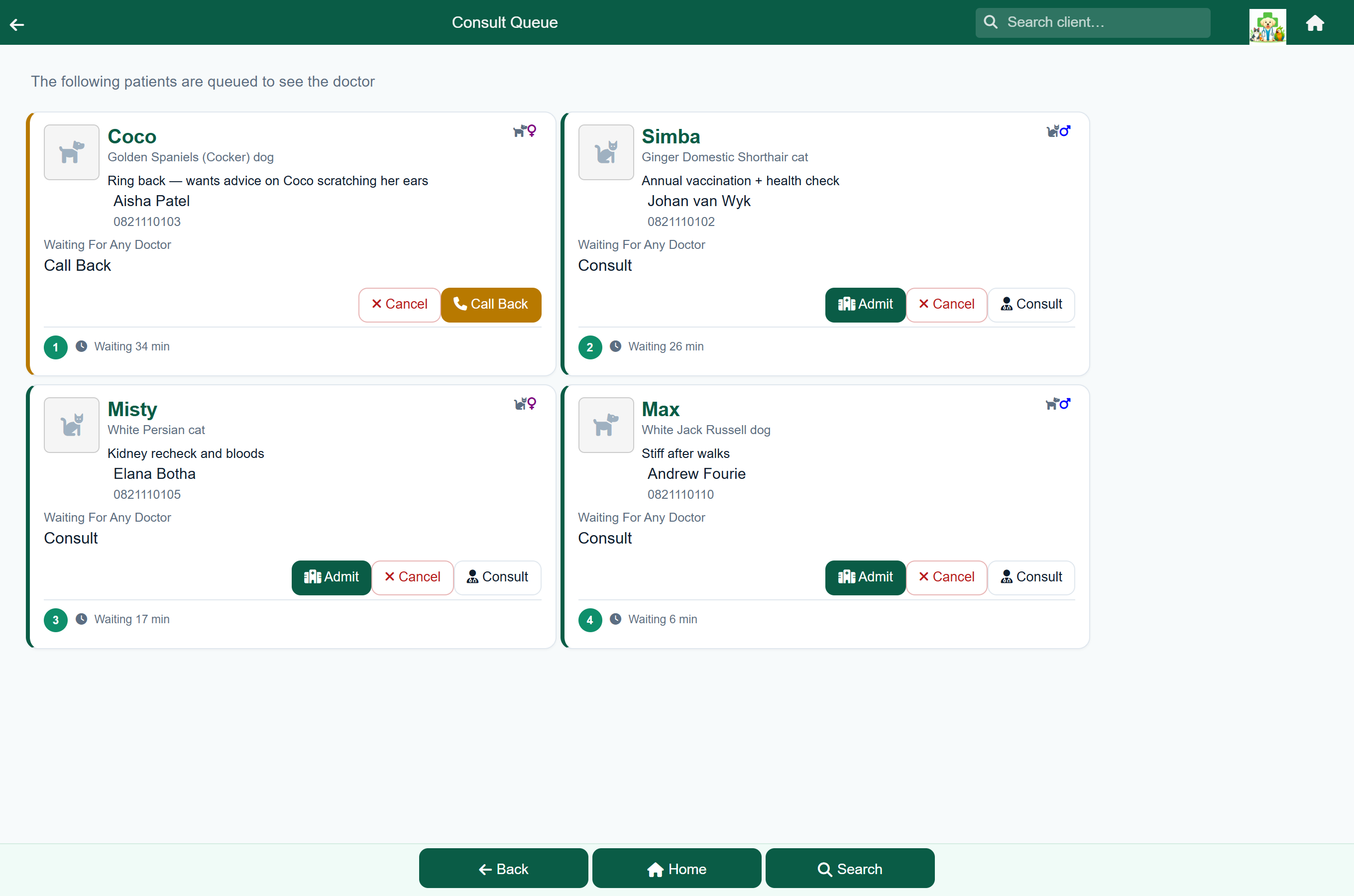
Each card shows the patient, their weight, the owner and number, the reason they are in, their place in the queue and how long they have waited. The longest wait is first. A card only names a vet when the patient is waiting for a particular one.
A patient who came from a booking carries their booked time, beside a small clock. A walk-in has no clock, so the two are told apart at a glance. This is why the time does not belong in the reason as well: “Consult: Vaccination + microchip” is a whole reason on a card that is already showing 09:00, and writing “9am” in front of it only repeats the card.
The queue keeps itself up to date. It re-reads itself every 30 seconds, so a patient another vet has just taken, or a row somebody has just cancelled, leaves your screen on its own, and a walk-in queued at the front desk appears without you doing anything. You never need to reload the page. While the tab is in the background it stops asking, and reads once the moment you come back to it, so the list is current when you return from the consulting room.
You can see who has a patient in hand. While a colleague has a patient's record open, the card shows Active with their name, so two people do not start on the same patient at once. When nobody has it open, the card shows Last with whoever last worked on it. The same line appears on the hospital and boarding lists for a stay a colleague has open. It keeps up with the 30 second refresh, and clears by itself a short while after the record is closed.
Filter the list by type. Above the cards is a row of pills: All, Consult, Dispense and Call Back, each with a count of how many patients of that type are waiting. Tap one to show only those patients, and All to show everyone again. The counts are of the whole queue, so they do not change as you switch pills, and they keep up with the 30 second refresh like the cards do. The filter does not change where anyone stands in line: the number on a card is still their place in the whole queue, not in the filtered view.
The buttons on a card depend on why the patient was queued, which you can also read off the colour down the edge of the card:
| Card says | Buttons |
|---|---|
| Consult | Consult opens the consultation. Admit starts a hospital admission instead. Cancel removes them from the queue without recording a visit. |
| Call Back | Call Back opens the record so you can log the call, plus Cancel. |
| Drug Dispense | Dispense opens a dispense (medicines charged without a full consultation), plus Cancel. |
| Grooming | Grooming opens the grooming record, plus Cancel. |
Fixing a weight from the queue#
The weight sits beside the patient's name on the card. Tap it to change it: the figure becomes a box, you type the right one, and the tick saves it without leaving the queue.
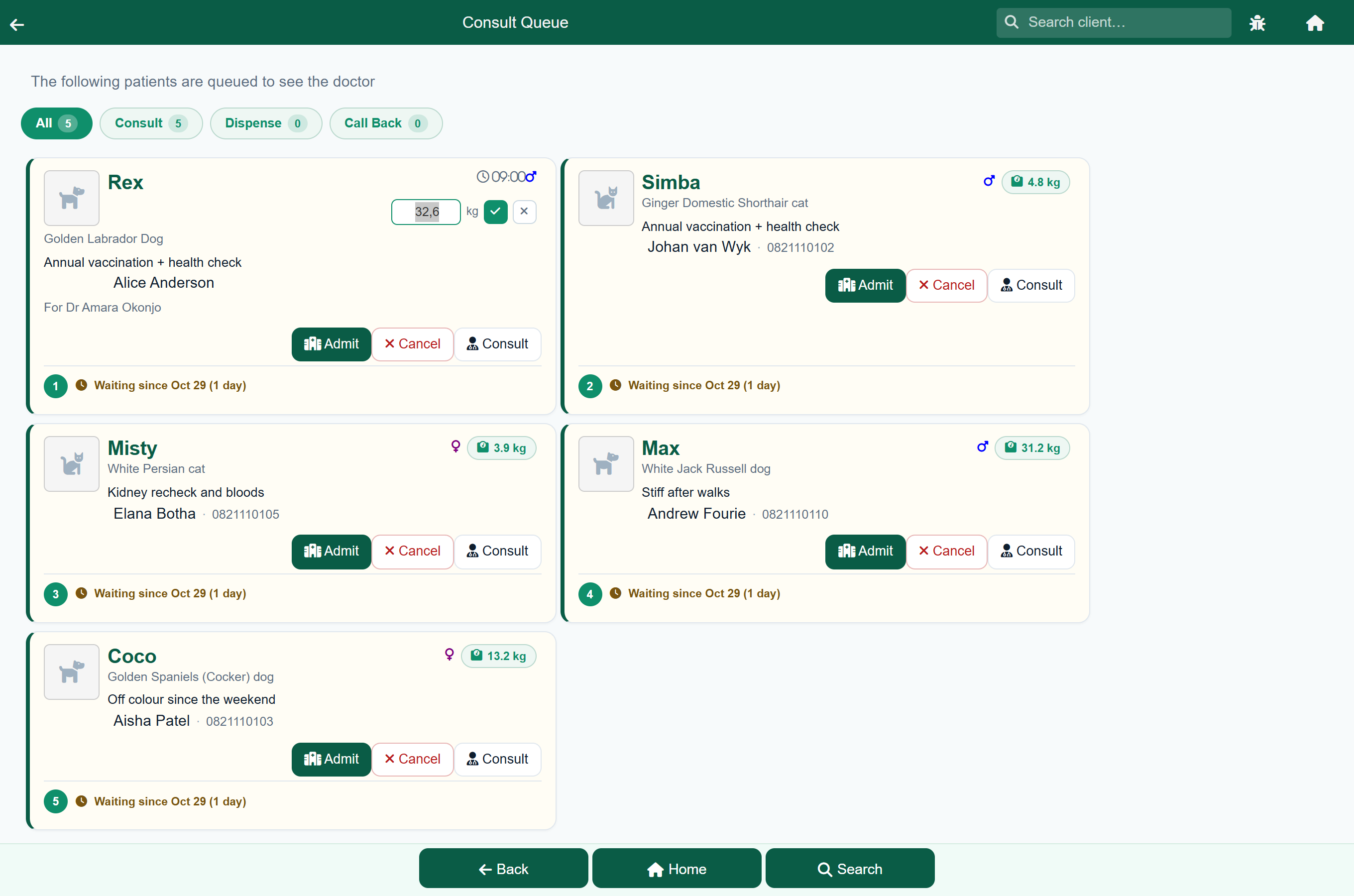
- A patient nobody has weighed shows Weigh in instead of a figure, so an empty one is visible rather than simply absent.
- If only an estimate was taken, the card shows it with a ≈ in front, so an estimate is never read as a figure off the scale.
- Clearing the box and saving removes the weight, which is what to do when it was entered against the wrong patient.
The other queues#
| Queue | Holds |
|---|---|
| Payment Queue | Every invoice a client still owes, plus sales still being rung up and consultations still with the vet. See below. |
| Hospital Patients | Animals currently admitted. See Hospital. |
| Boarding | Animals currently boarding. See Boarding. |
| Grooming Queue | Patients waiting for grooming. See Grooming. |
| Lab Results Available | Lab results that have come back and not yet been reviewed. See Lab results. |
| Refill Requests | Repeat-medication requests from the client portal. See Prescriptions. |
| Quotes Awaiting Reply | Quotes sent to clients who have not yet answered. See Quotes. |
| Shop Dispatch | Online shop orders waiting to be handed over. See The online shop. |
The payment queue#
Home›Payment Queue
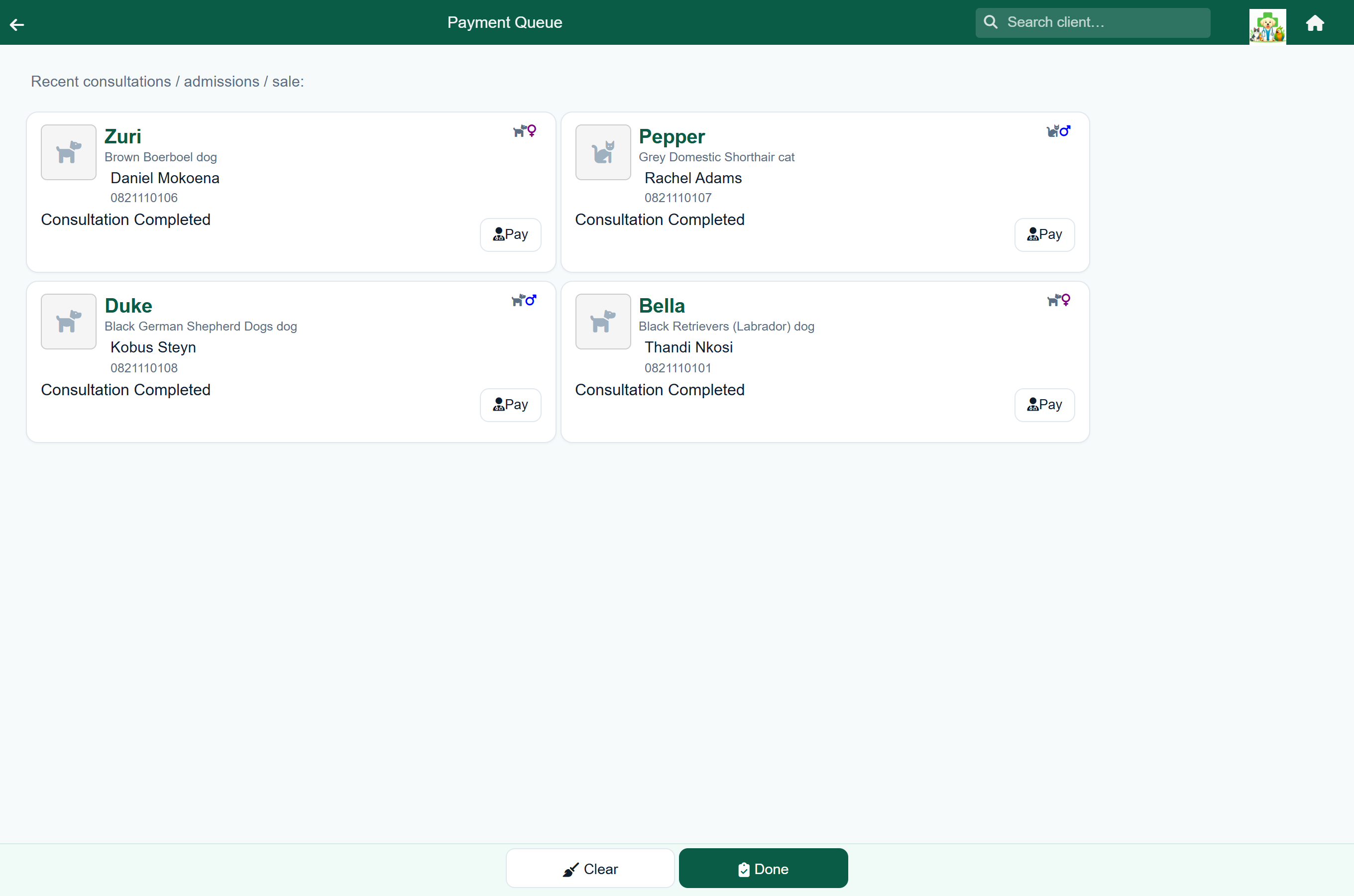
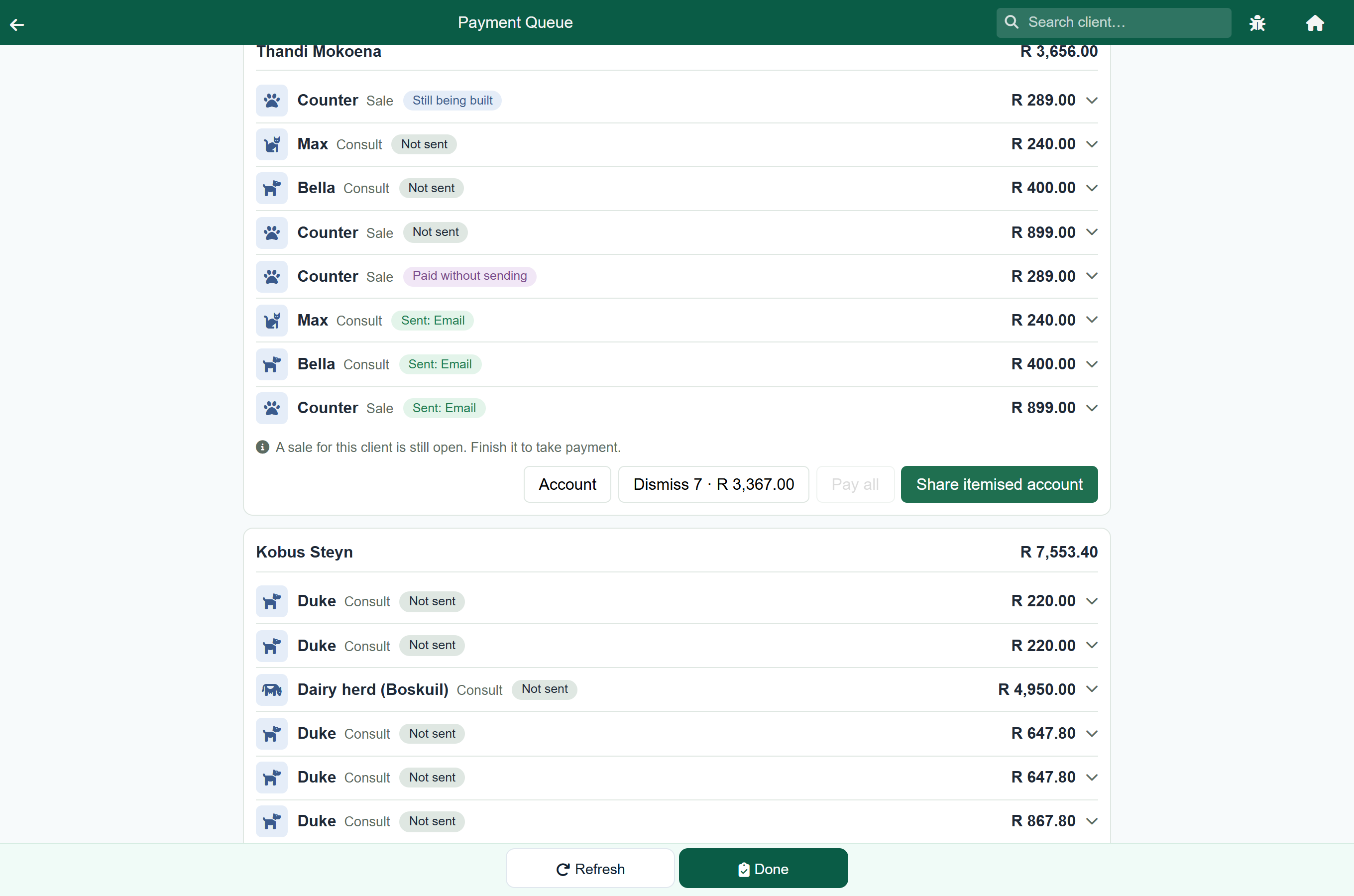
The payment queue is the front desk's list of money still to collect. It shows every invoice a client has not yet paid from the last 30 days, from consultations, sales, hospital and boarding stays and grooms, plus any sale still being rung up and any consultation still with the vet. Across the top are how many invoices are open, what they come to, how many have not been sent to the client, and how old the oldest one is. The search box above the list finds a client, patient, invoice number or phone number.
Each line is one invoice: the patient (or Counter for a sale that is not for a pet), the client, what it is, whether the client has been given it, and what is still owed on it. Tap the line for the rest: its invoice number, when it was raised, who sent it, and a button that opens the consultation, sale, hospital or boarding stay, or groom behind it.
| It says | Means |
|---|---|
| Not sent | Nobody has sent the client this invoice yet. |
| Sent: WhatsApp, Email, SMS or printed | Somebody sent or printed it. Tap the line to see who and when. It records that it was sent, not that the client has read it. |
| Link copied, not sent | The link was copied, but a copied link may never have been pasted anywhere, so it does not count as sent. |
| Paid without sending | Somebody took the payment without sending it first. See below. |
| Still being built | A sale that has been started and not finished. |
| With the vet | A consultation that has begun and not been finished, with what it comes to so far. It becomes an invoice when the vet finishes it. |
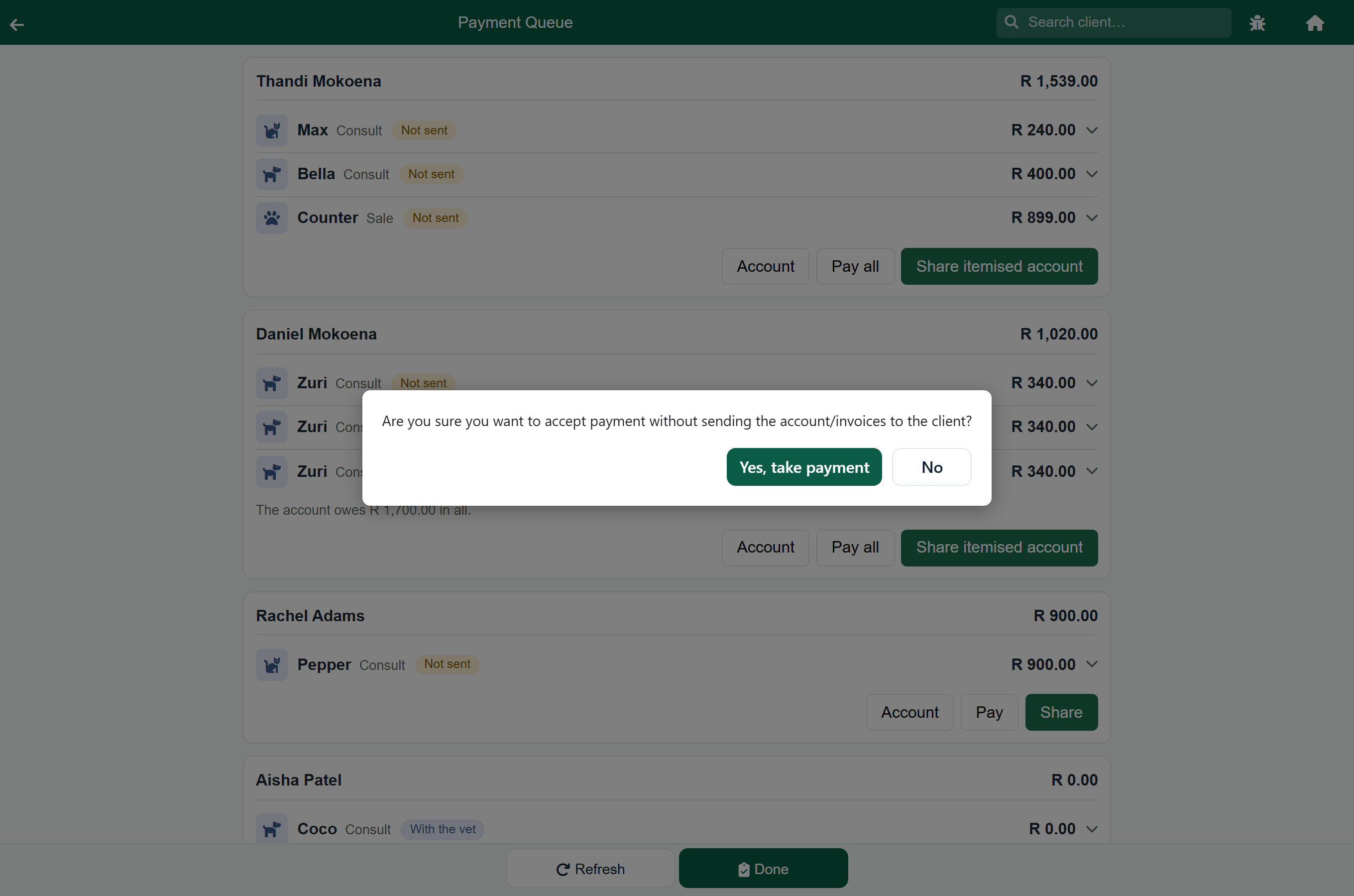
Each card has Account (the client's account), Pay and Share (send it to the client). The dark button is the next step: Share while the invoice has not gone to the client, then Pay. A sale that is still being built has Open the sale instead, which reopens it, and a consultation still with the vet has Open the consultation, which opens it where the vet left it.
Pay opens the payment screen with that invoice's amount filled in. If the client owes more than that on their account, the payment screen says how much more, so you can ask for it too.
- An invoice leaves the queue when it is paid, not when somebody opens it. Payments settle the oldest invoices first, so a part payment leaves the newest one on the list with what is still owed and its full amount beside it.
- Where the client owes more than the invoice in front of you, the line says what the account owes in all.
- Use Not sent, Sent and Not finished to narrow the list, and All to see everything again.
- Left out on purpose: cash sales, which are paid at the till as they are rung up (the top of the screen counts any that are open, and takes you to them), business accounts, which pay by statement, and online shop orders, which have their own list.
- A client who leaves without paying still owes it, and stays on the queue for 30 days. Chase older debt from the account book.
- A client who pays on their account (at the end of the month, say) need not sit on the queue all month. Tap the invoice and press Dismiss, or press Dismiss on a grouped client card to take all of theirs off at once. The invoices stay on the client's account and are still owed; they just leave the front desk's list. Dismissed at the top shows them, with who dismissed them, and Bring back puts them on the queue again. A new invoice for the same client shows as usual.
One visit, several invoices: group by client#
A visit often ends as more than one invoice: two pets seen together are two invoices, and food bought before or after the vet is a sale of its own. Tick Group by client to put each client's invoices together on one card, with one total. FastVet remembers the choice on that computer, so the desk that works this way keeps it.
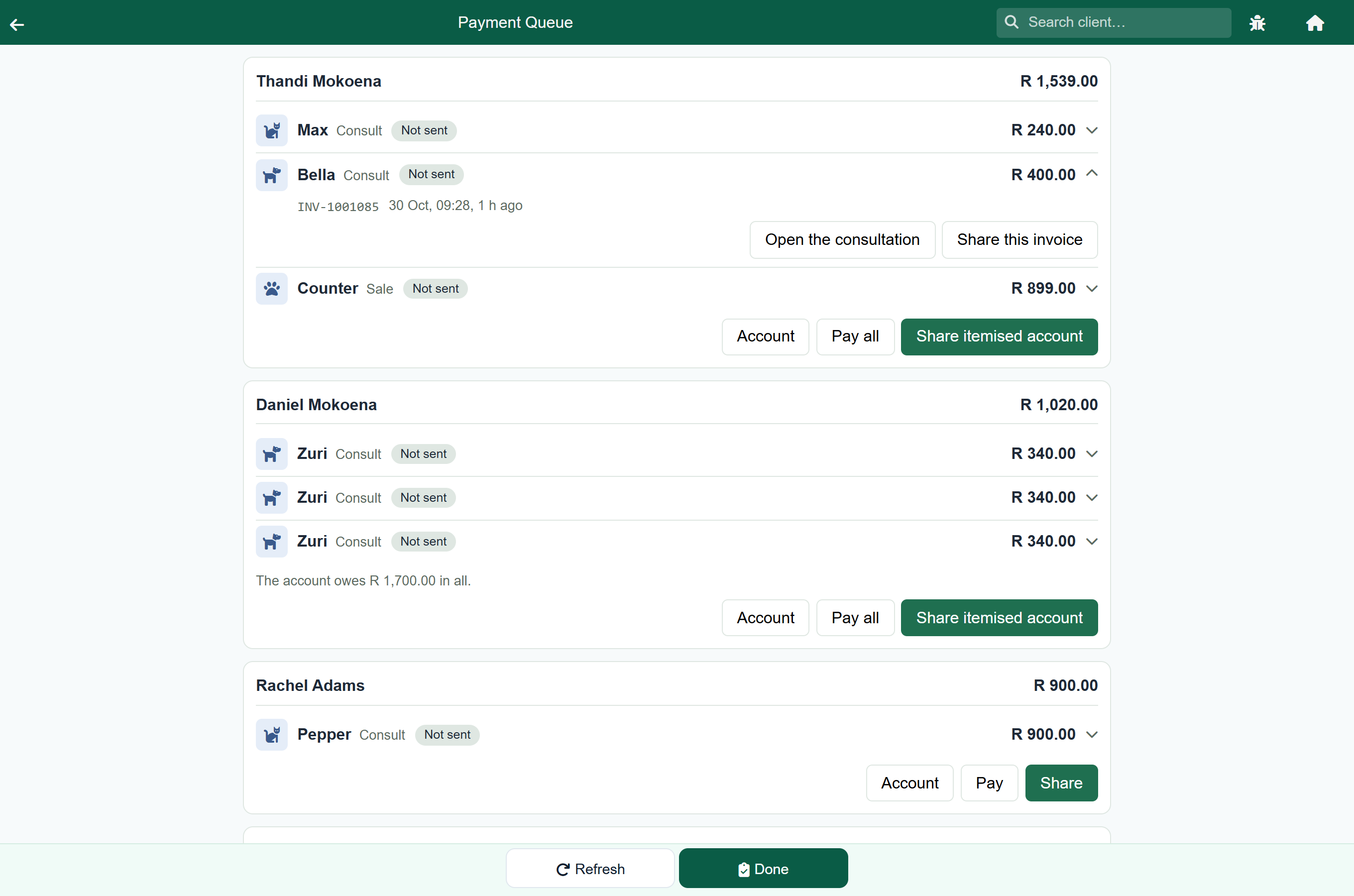
- Share itemised account sends the client one document with every invoice on the card, grouped by pet, instead of three separate invoices. Sending it counts as sending each invoice on it. See The itemised account.
- Pay all opens the payment screen with everything on the card filled in, so they pay once, on one receipt.
- Tap any line on the card to open that invoice's detail, or to share just that one invoice.
- Searching while the list is grouped finds clients: a match on one pet brings back the client's whole card, so the other invoices from the same visit are not missed.
If a sale for that client is still being rung up, or a consultation is still with the vet, the card says so and Pay all stays greyed out until it is finished. Until then its items are not on the account, so a client who paid the balance would leave without paying for them. Tap the sale's line and press Open the sale to finish it; a consultation goes on the account when the vet presses Done.
Sending the invoice before taking payment#
While an invoice has not been sent to the client in any way (WhatsApp, text, email or print, of the invoice or of an itemised account that includes it), pressing Pay or Pay all asks first: Are you sure you want to accept payment without sending the account/invoices to the client? Press No and send it from Share first, or Yes, take payment to go ahead. It never stops a payment. Going ahead is recorded against the invoice as Paid without sending, with who did it. Pay on the itemised account screen asks the same question.
If your practice has switched on Send Before Payment, unsent invoices of at least the amount it gives also turn amber, and a line under the boxes at the top says which invoices the practice wants sent first.