
Help Centre › Stock & pricing
Zero-rated and exempt items
Charge some items without VAT: animal feed and remedies sold to an authorised farming client, and anything your practice treats as exempt.
Most practices charge one rate of VAT on everything, and nothing in this topic applies to them. A practice with farming clients is different: the same bag of feed is zero rated to a farmer who holds a SARS authorisation, and carries VAT for everyone else.
FastVet handles that by letting you mark which items can be zero rated, and which clients are authorised to buy them that way. The rate on a line is then decided by the two together, when the item is charged.
What decides the rate#
Two things, and both have to agree:
- The item carries a tax class: Standard rated, Zero rated (farm goods) or Exempt. This lives on the price list item.
- The client either holds a farming authorisation or does not. This lives on the client record.
So a bag of feed marked Zero rated (farm goods) is sold without VAT to an authorised farming client, and at the usual price, VAT included, to everybody else. Nothing about the item changes between the two sales: the same item simply prices differently for different buyers.
An item marked Exempt carries no VAT for anyone, whoever is buying.
| The item is | The client is | What they pay |
|---|---|---|
| Zero rated (farm goods) | an authorised farming client | the price without VAT |
| Zero rated (farm goods) | anyone else | the usual price, VAT included |
| Exempt | anyone | the price without VAT |
| Standard rated, or not set | anyone | the usual price, VAT included |
An item you have never classified is standard rated. That is what the vast majority of a catalogue is, so there is no need to go through and mark everything.
Marking which items can be zero rated#
Home›Stock & Prices›Update Prices
Search for the item, press Edit on its row, and pick from the Tax class box. On a phone, tap the item first and then Edit.
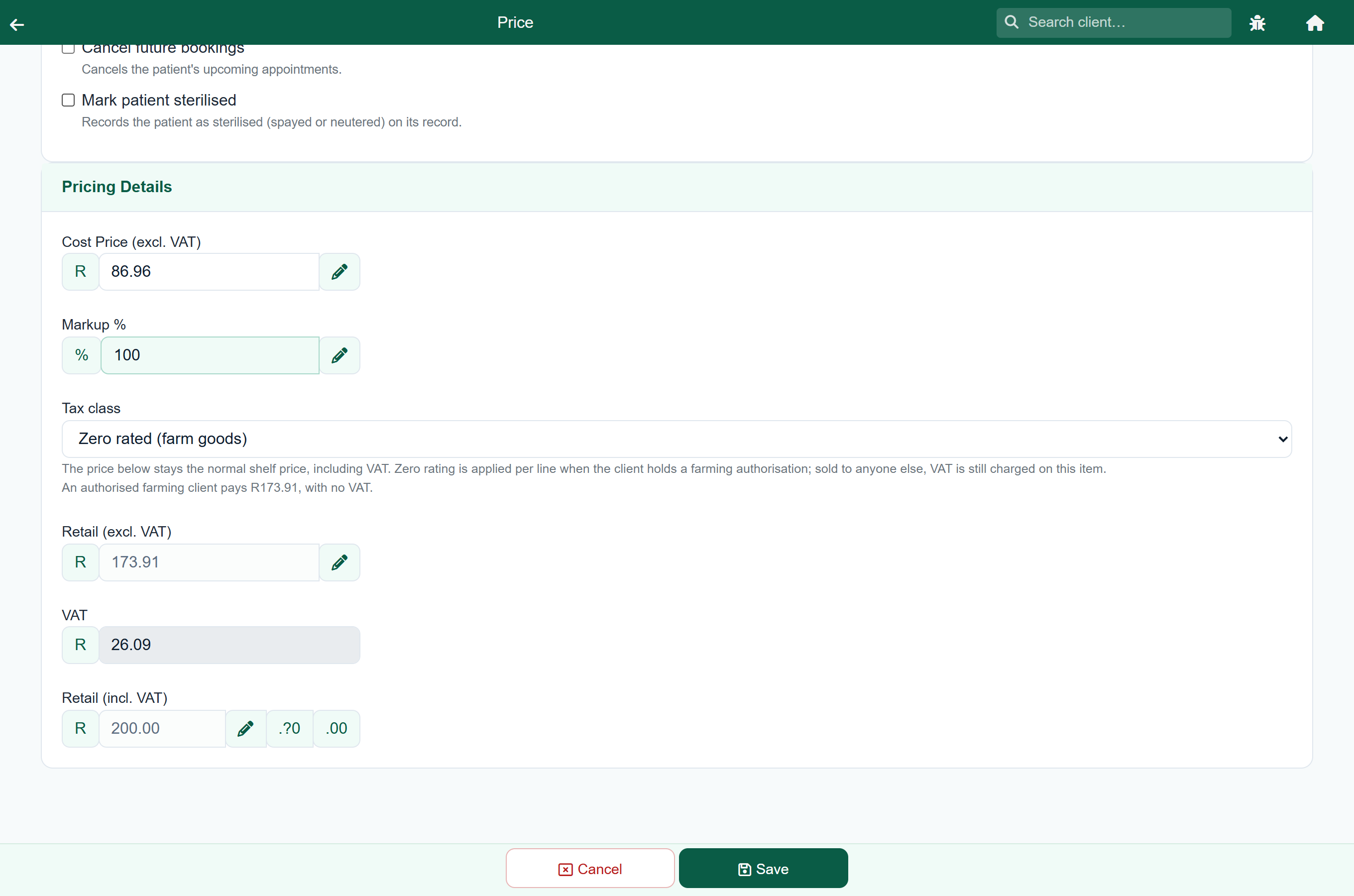
The price underneath stays exactly as it is. The catalogue always holds your normal shelf price, including VAT, because that is what most buyers pay. Underneath the box FastVet shows what an authorised farming client would pay for the same item, so you can see both figures at once.
A bag of feed at R200.00 on the shelf reads:
| Buyer | Charged | VAT |
|---|---|---|
| An authorised farming client | R173.91 | none |
| Any other client | R200.00 | R26.09 included |
That first figure is the line FastVet shows under the Tax class box: your shelf price with the VAT taken out of it. It is usually the same as the Retail (excl. VAT) box further down, but where the two differ by a cent it is the line under Tax class that matches what the client is charged.
Marking a whole category at once#
Farm goods usually come in whole categories: the feed, the dips, the dosing remedies. You can set the tax class across a selection rather than item by item.
- Search or filter until the list is small enough to edit together.
- Tick the rows you want, or the box in the header to take all of them.
- In the bar that appears, choose a class under Tax class and press Apply.
- Press Save.
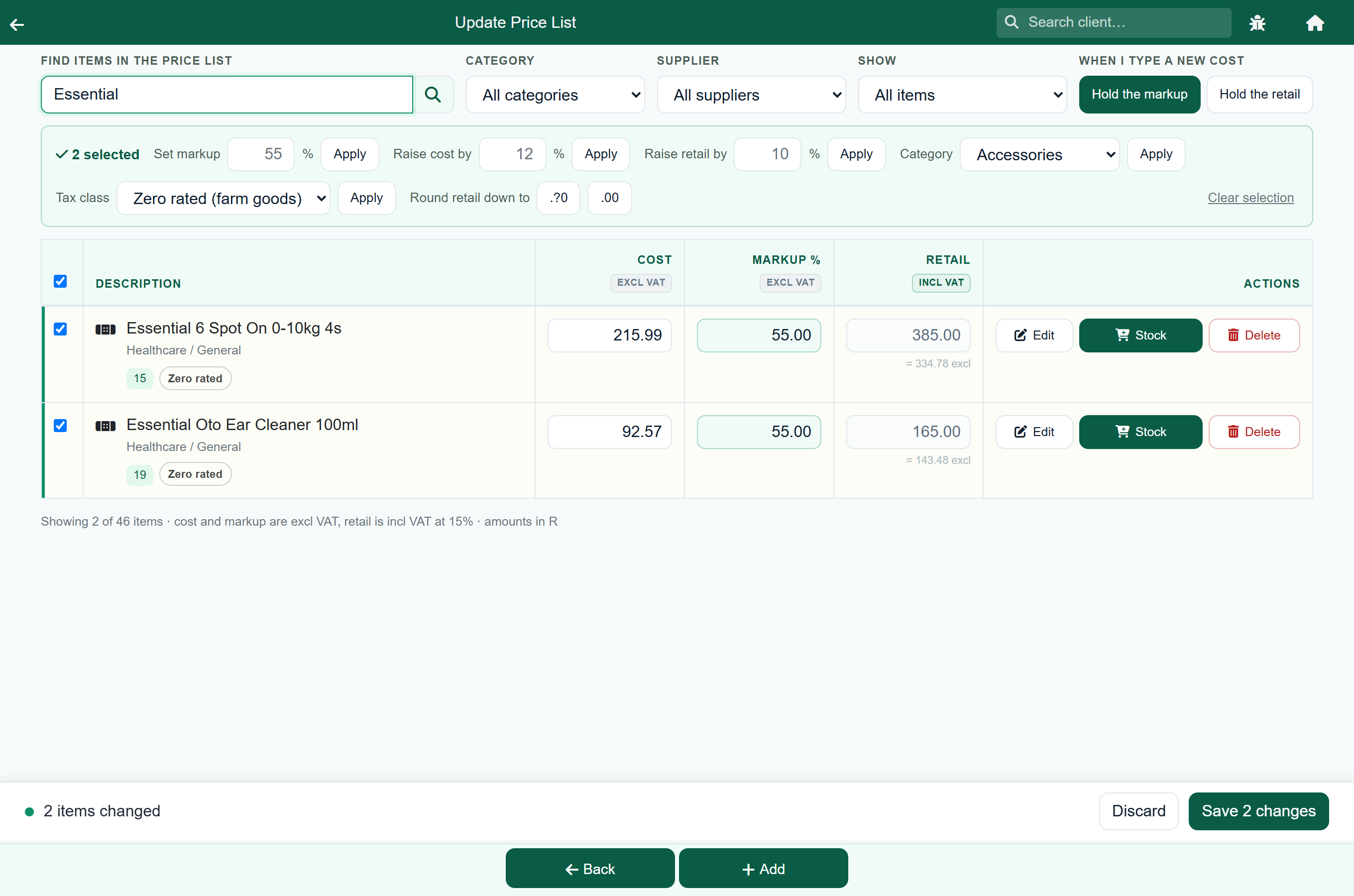
Each row picks up a small Zero rated badge as you apply it, so you can run an eye down the list before saving. Nothing is written until you press Save, and Standard rated is on the list too, so a category marked by mistake goes back the same way.
Recording a client's authorisation#
Home›Search Client›the client›Edit
Zero rating is the buyer's entitlement, not the practice's. A farming client who qualifies has it stated on their SARS Notice of Registration, and that is what you are recording here.
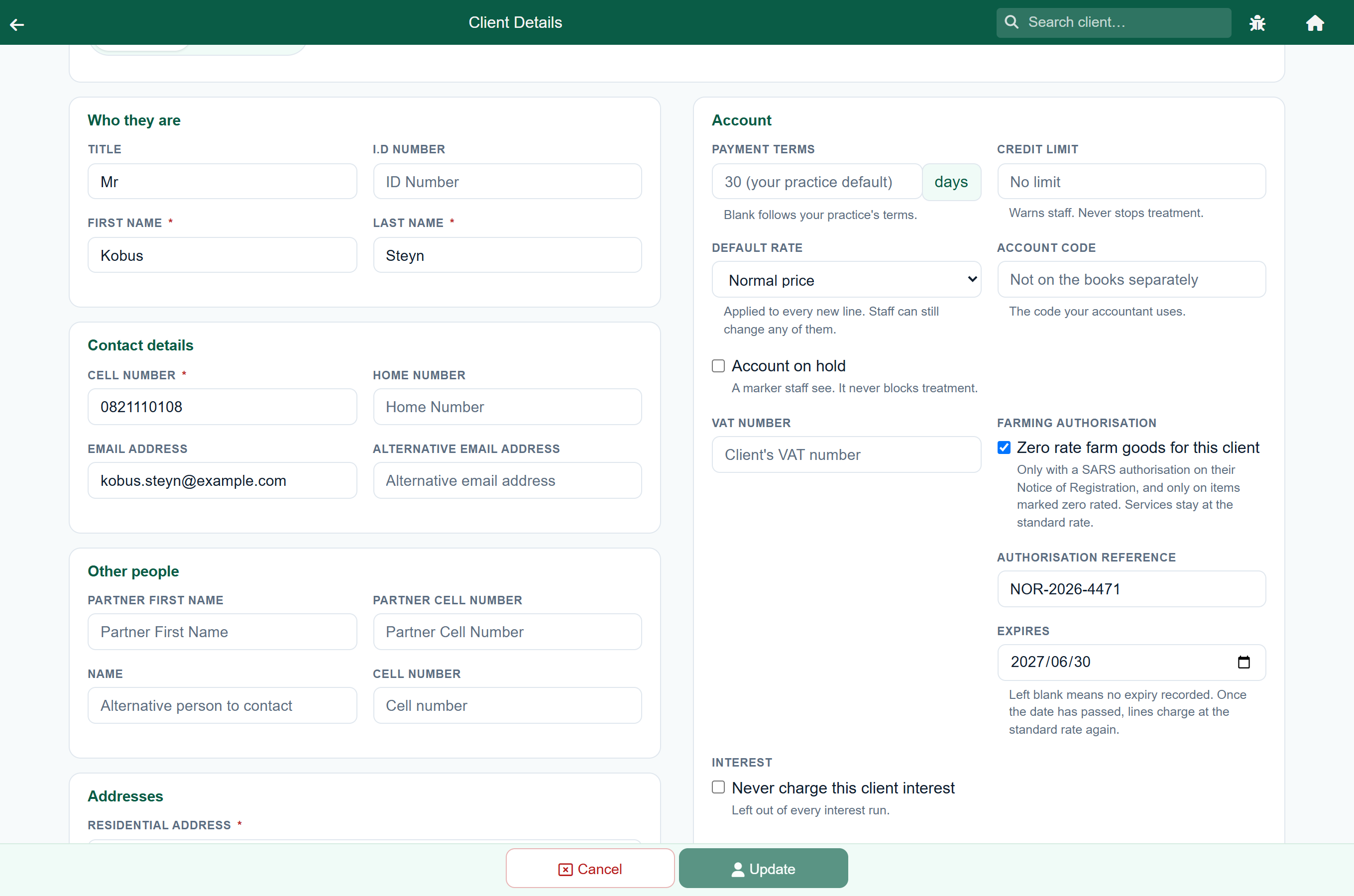
Tick Zero rate farm goods for this client and two more boxes appear:
- Authorisation reference: the reference from their notice, so the next person to look at the account can see where it came from.
- Expires: the date it runs to, if their notice carries one. Leave it blank if there is no end date.
Where an expiry date is set, FastVet reads it against the date on the consultation, sale or stay, not against today. A visit from last month is still zero rated on an authorisation that has since run out, which is what makes a late invoice match the one the client was expecting.
Once the date has passed, new lines charge at the standard rate again.
Charging a zero-rated item#
Nothing changes about how you charge. Pick the item as usual and FastVet works the rate out from the item and the client.
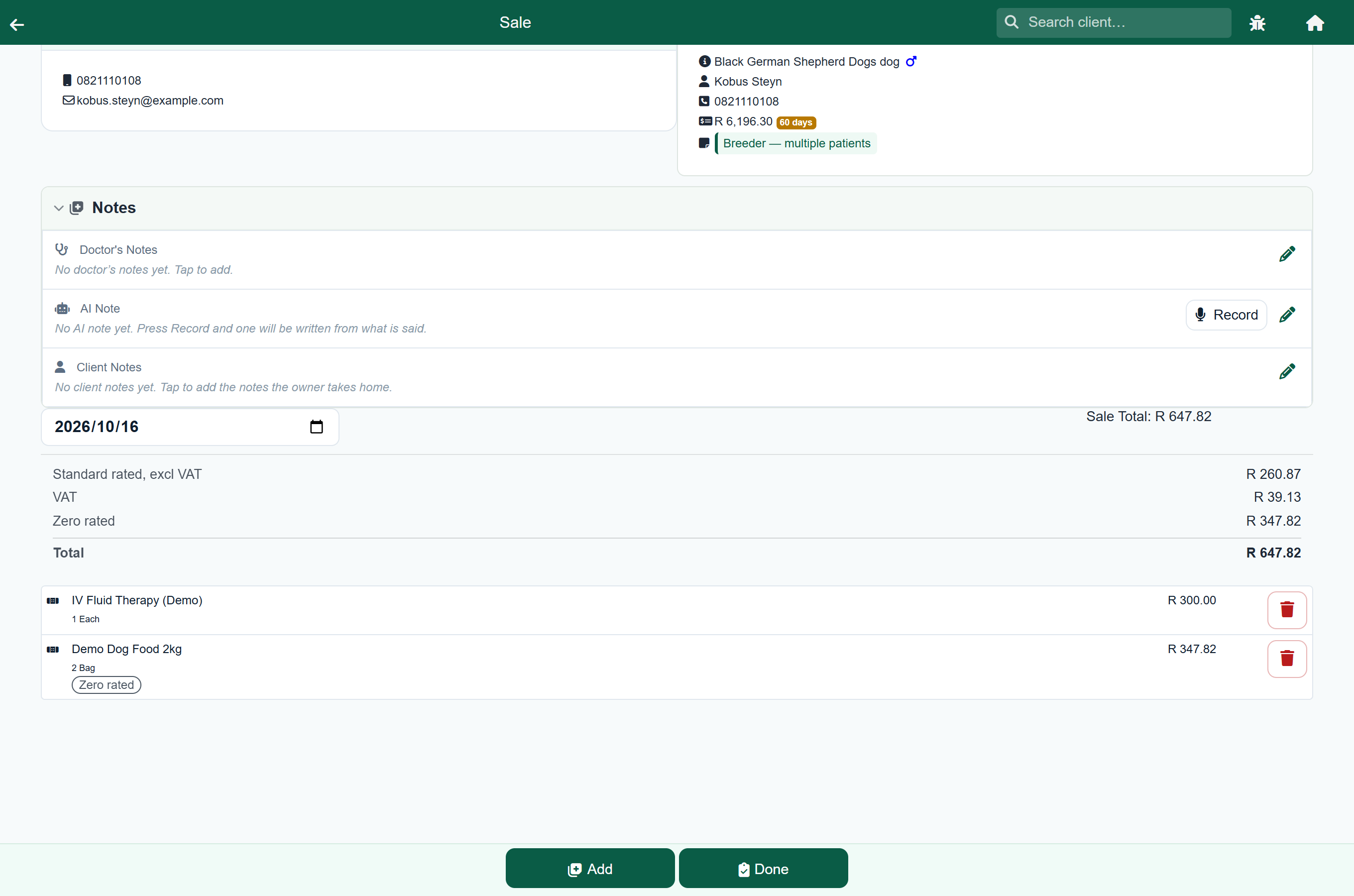
On the invoice list, a line that is not standard rated carries a small Zero rated or Exempt label under its name. Standard-rated lines carry nothing, because that is almost all of them and a label on every line would be noise.
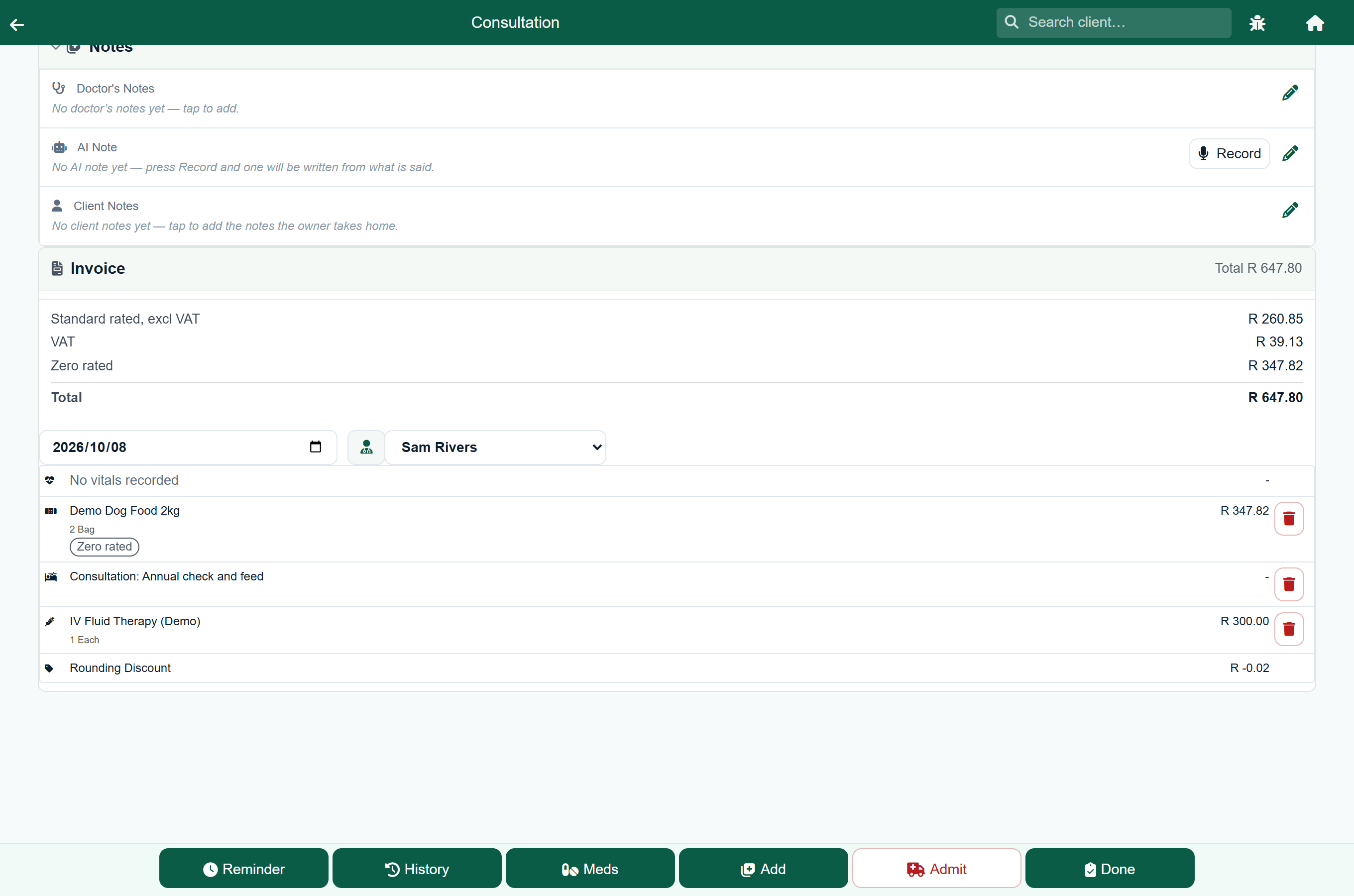
The summary above the lines splits the visit three ways, so the figures reconcile at a glance:
| Line | What it is |
|---|---|
| Standard rated, excl VAT | the part carrying VAT, before it |
| VAT | the VAT on that part |
| Zero rated | the part of the visit carrying no VAT |
| Total | the three added together |
That is the order the invoice prints them in, so you can read this summary out to the client and they will find the same figures in the same order on the document you hand them. An Exempt row appears under Zero rated when there is an exempt amount on the visit.
A counter sale shows the same label and the same split, so a till sale to a farming client reconciles the way a visit does. Hospital and boarding stays do too.
Where medication is supplied against a repeat prescription, both the refill form and the counter screen quote the price this client will be charged, with the same label beside it. The figure you read out is the figure on the invoice.
Changing the rate on one line#
Open a line and there is a Tax box with the same three choices. Use it when a particular sale needs a different treatment from the catalogue default. It is on a line of a consultation, a stay, a quote and a counter sale alike.
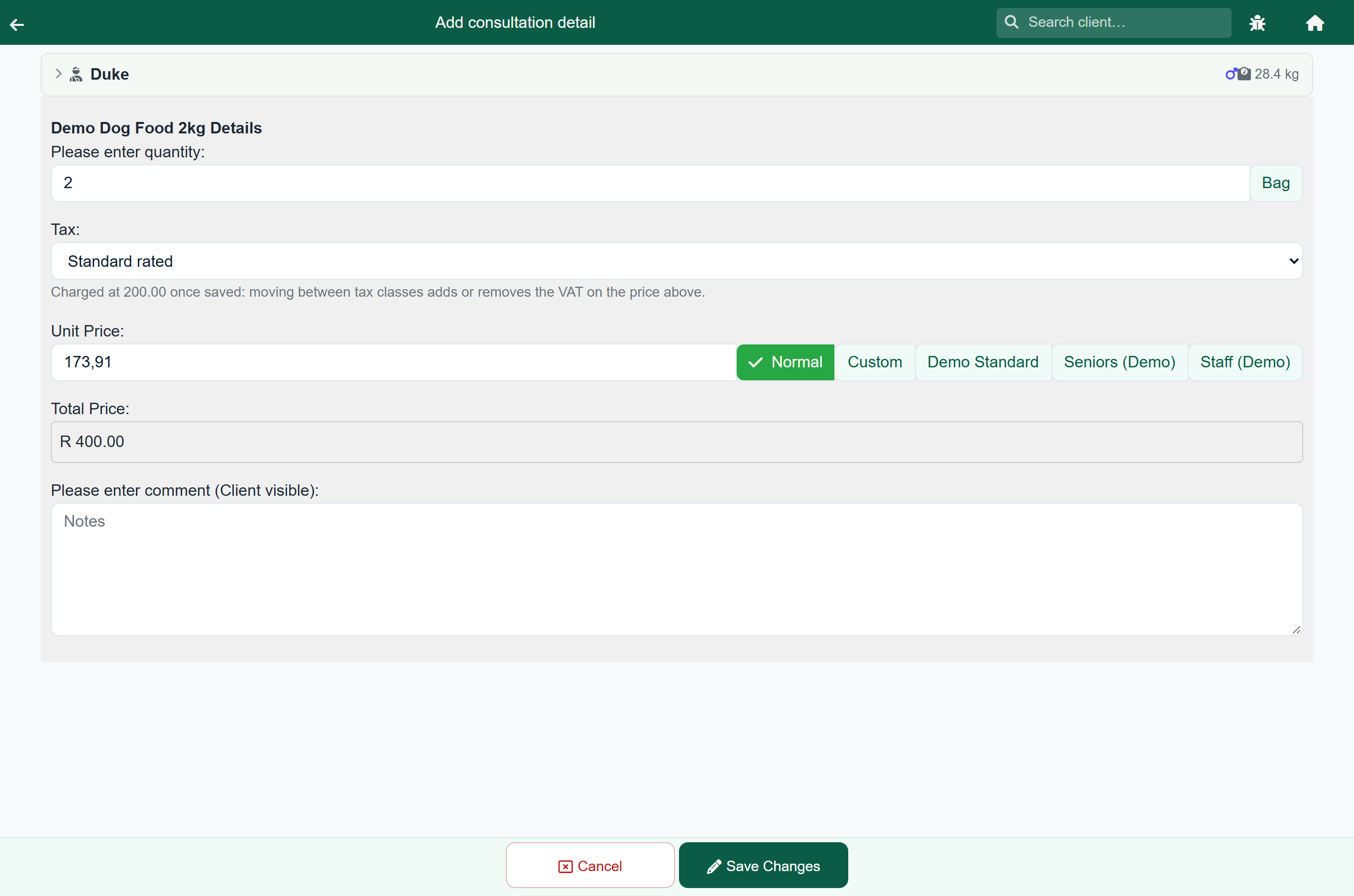
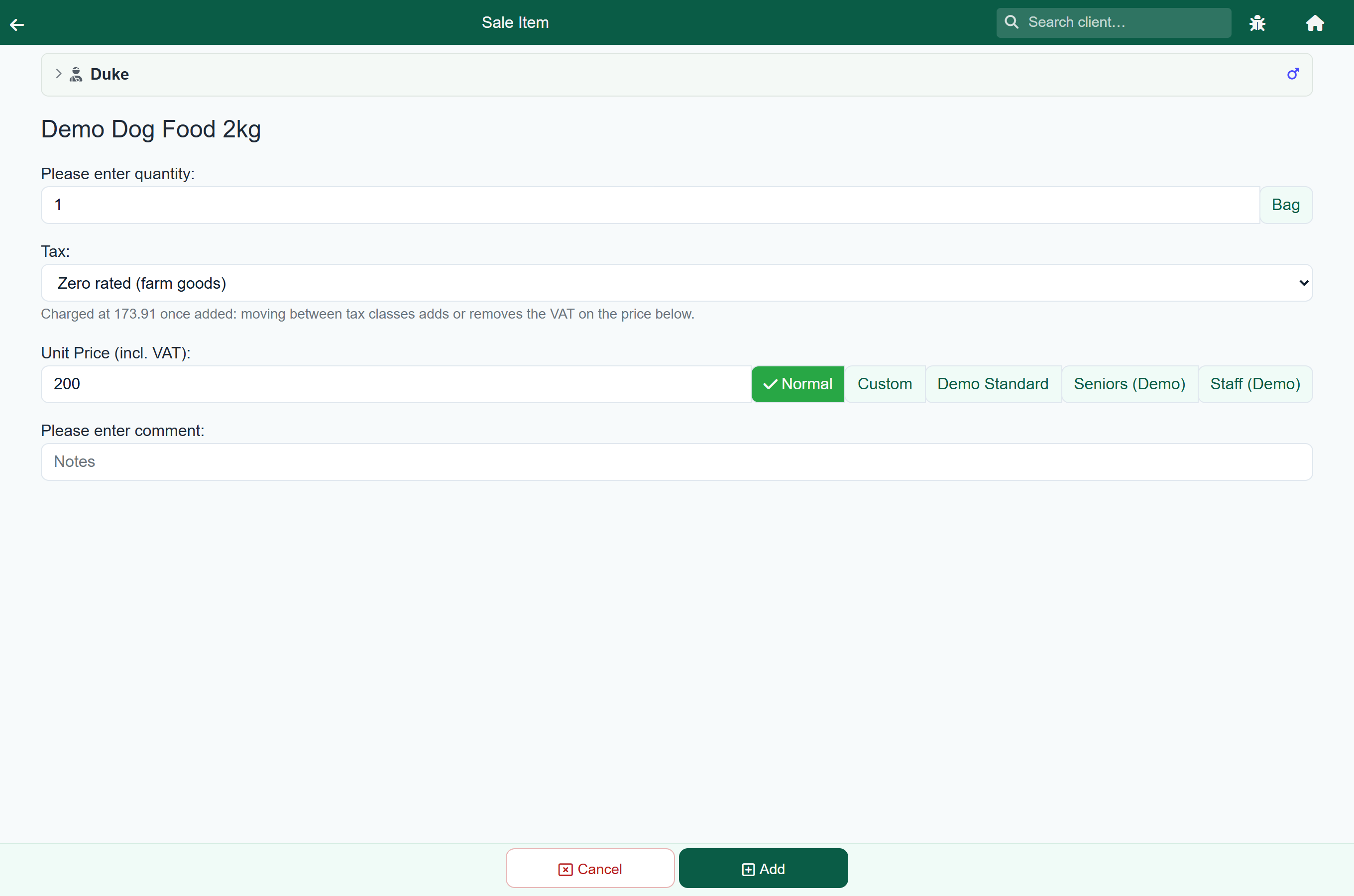
FastVet shows what the line will come to before you save it, because moving between classes adds or removes the VAT on the price below it. The total on the line follows the same figure, so the two always agree.
If you zero rate a line for a client with no authorisation on file, FastVet says so and charges it as you asked. It is a reminder, not a stop: you may be recording something the paperwork has not caught up with yet, and you can add the authorisation to the client record afterwards. Every line set by hand this way is listed in Zero rated lines, so nothing is charged without VAT that nobody can account for later.
On a protocol#
A protocol has two different things to tax, and both can be set:
- The Protocol Charge has its own Tax box, underneath the price. Where the protocol charges a package price, this is the one that matters: the parts are recorded against the visit and the whole charge sits on the protocol line.
- Each part has the same Tax box inside it, reached with the pencil. Where the protocol charges the sum of its parts, these are the ones that carry the money, so these are the ones to set.
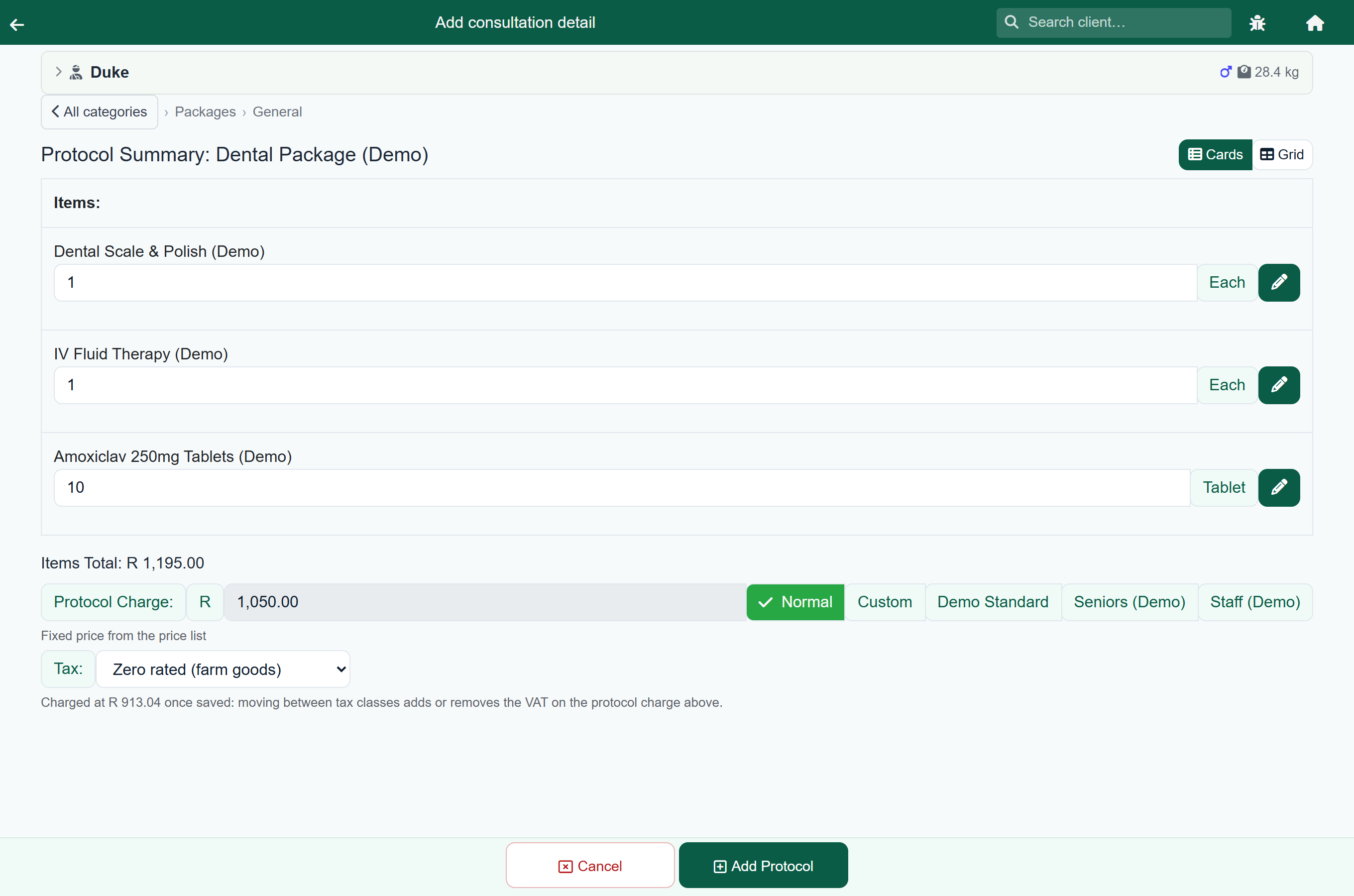
Both read the catalogue and the client exactly as an ordinary line does, so a protocol built from farm remedies for an authorised client comes out zero rated without anyone setting anything.
What the client sees#
The invoice names each portion, so a farming client can see the zero-rated part without working it out:
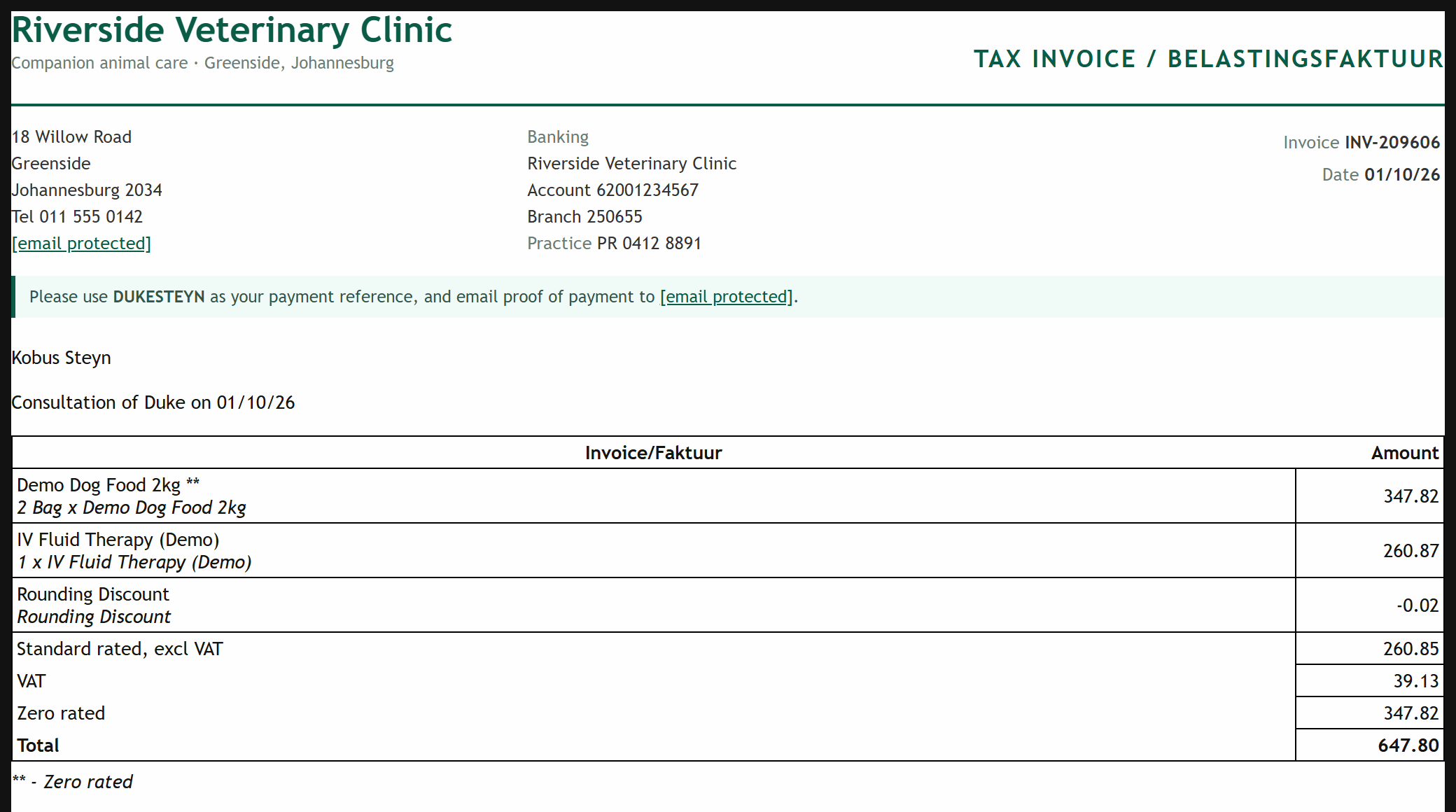
| Line | Reads |
|---|---|
| Standard rated, excl VAT | the part that carries VAT, before it |
| VAT | the VAT on that part |
| Zero rated | the part that carries none |
| Total | the three added together |
Each row adds to the one below it, so the total can be checked down the column. An Exempt row appears the same way when there is an exempt amount on the document.
An estimate says the same thing before any of it is charged. A quote line that carries no tax is marked the way a consultation line is, and a line reading Of which zero rated sits above the total:
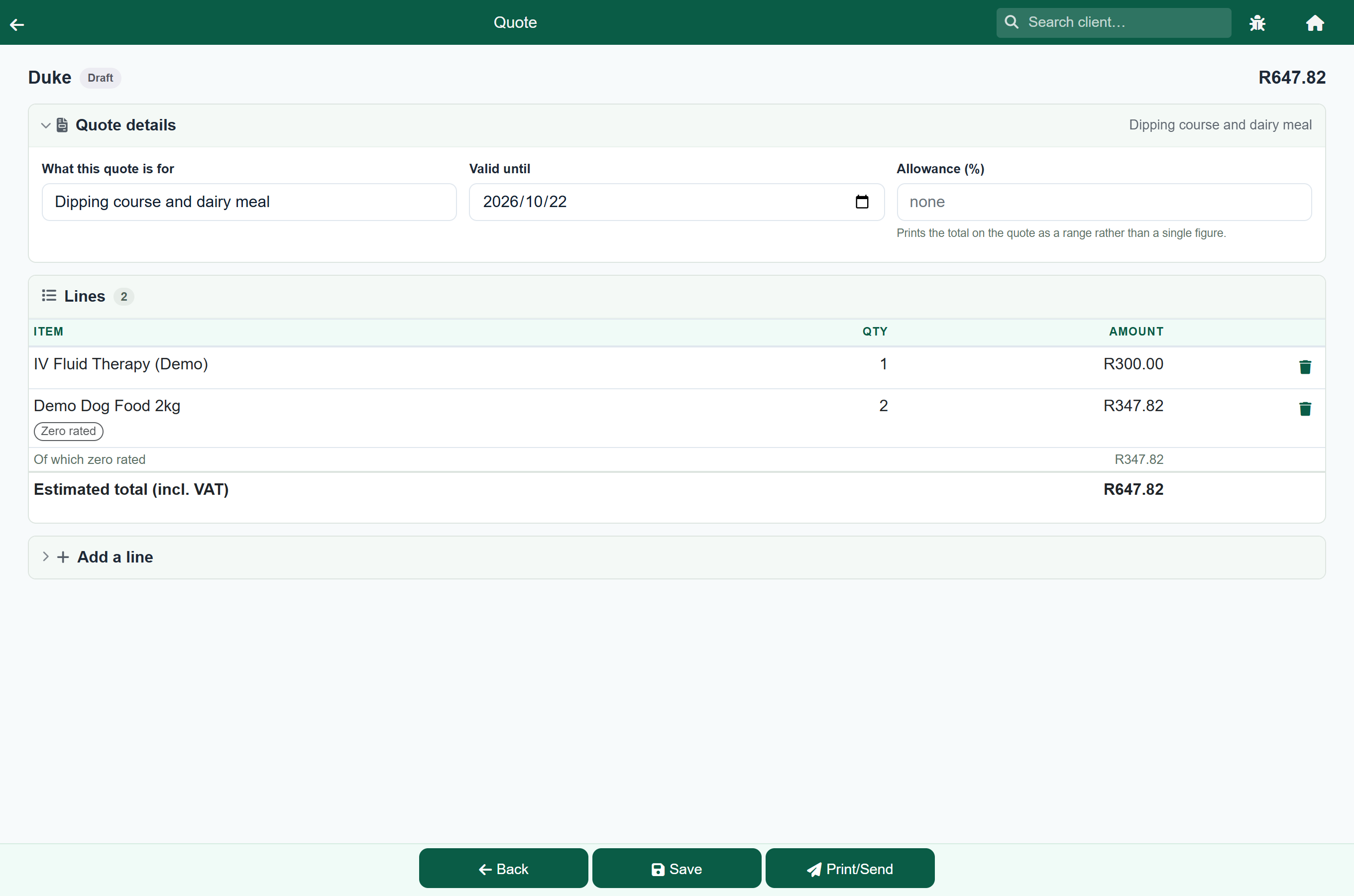
The owner sees that too, on their estimate in the client portal, so the figure they agree to is the figure they can check.
The lines those figures come from are marked, so the client can see which items they are rather than working back from the total:
| Mark | Means |
|---|---|
| ** | this line is zero rated |
| *** | this line is exempt |
Underneath the table a short note explains whichever marks appear. Neither the mark nor its note shows on a document that has none, so an ordinary invoice reads exactly as it always has.
A practice charging a single rate sees the Sub Total it always has, unchanged.
On the reports#
Home›Reports›VAT summary
The VAT summary opens on the tax class, and you can drill into each one by category, subcategory and item:
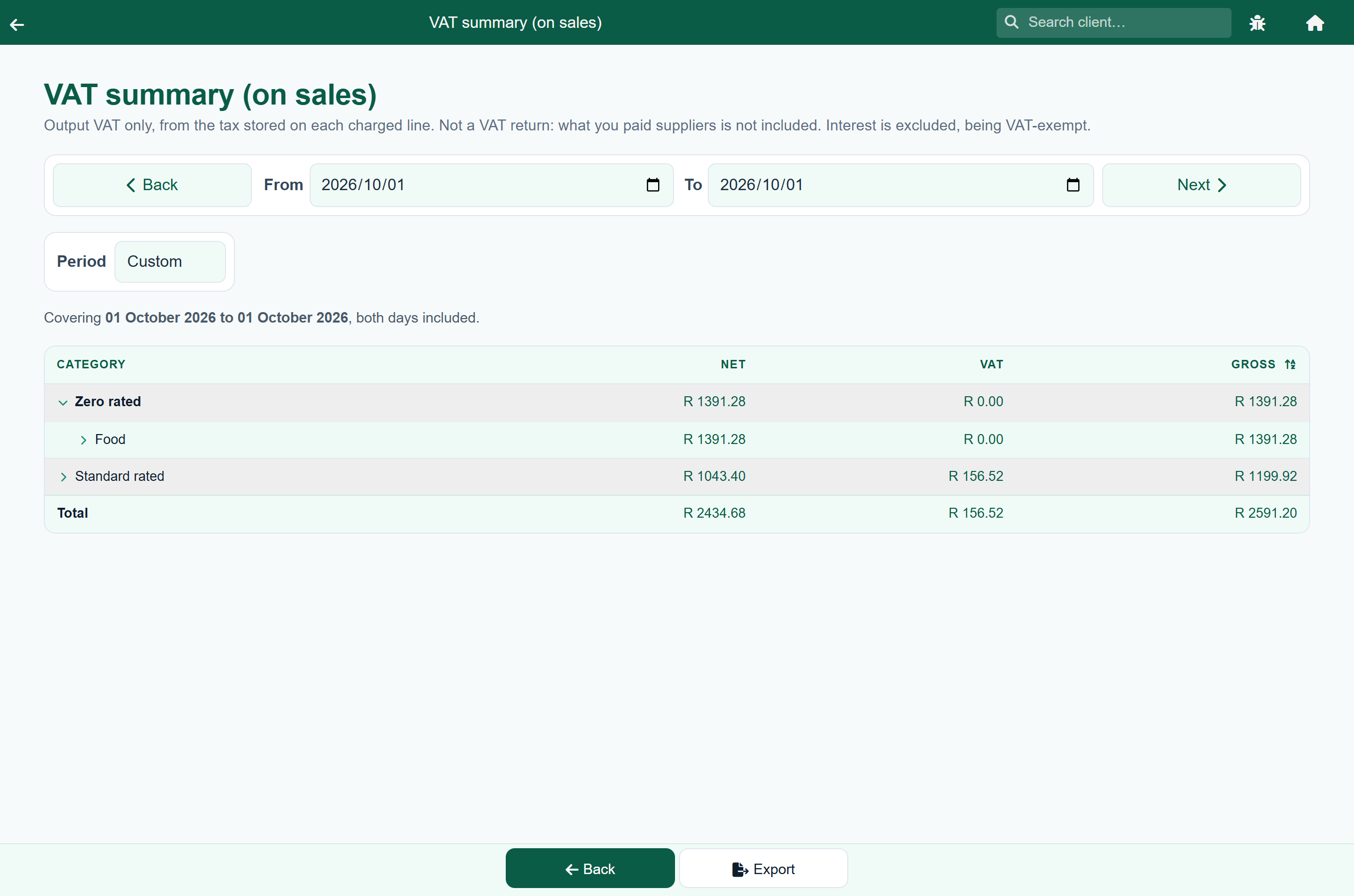
Zero-rated and exempt turnover is still turnover, so it is reported in full with no VAT against it. That is the split a VAT return asks for.
Checking what you zero rated#
Home›Reports›Zero rated lines
Zero rating is the one thing here you may have to justify. SARS asks the supplier to hold the buyer's authorisation, so this report lists every line you charged without VAT and says what it rested on:
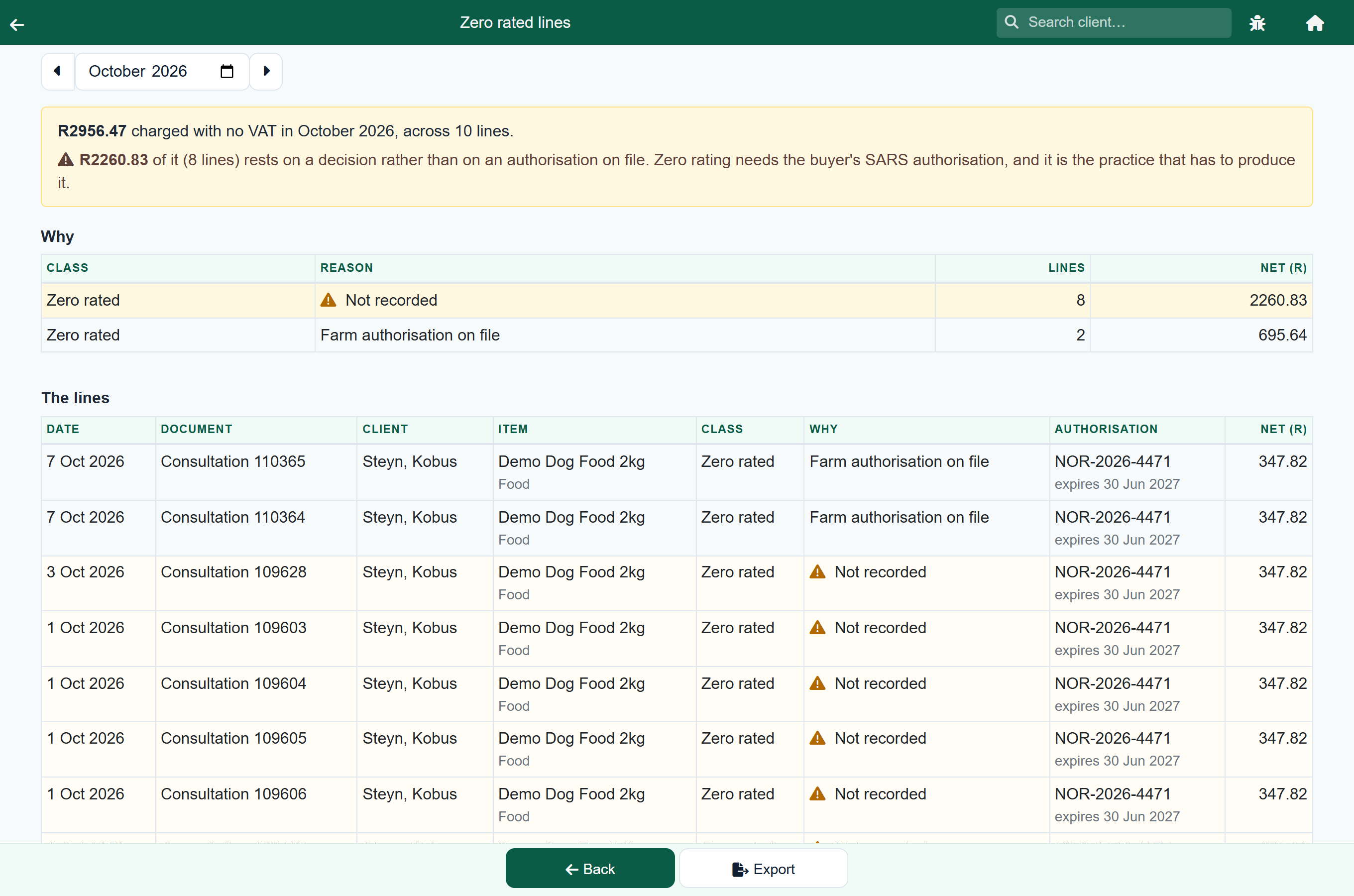
It opens on the answer. The sentence at the top gives the month's total, and then how much of it rests on a decision rather than on an authorisation you hold. That second figure is the one to look at.
| Reason | What it means |
|---|---|
| Farm authorisation on file | the item is marked zero rated and the client held an authorisation. Nothing to do |
| Item is exempt | the item is marked exempt, which does not depend on the client |
| Set by hand, client authorised | somebody chose the class on the line, for a client who is on file |
| Set by hand, no authorisation | somebody chose it for a client with no authorisation recorded. These are the ones to chase |
| Follows the lines it adjusts | a discount or a rounding line, which takes the treatment of whatever it was applied to |
| Not recorded | charged before FastVet started recording the reason, or imported. Nothing is implied either way |
Clicking a row in the Why table narrows the lines underneath to it, so "show me the ones nobody authorised" is one click. Export sends what is on screen to Excel.
A line set by hand is not a mistake. The vet is in front of the client and FastVet does not stop them, which is deliberate. The point of the report is that nothing is charged without VAT that nobody can account for later.
On a quote#
A quote works the rate out the same way, for the client it is addressed to. So a quote to an authorised farming client shows the zero-rated figures, and the invoice that follows matches what they were quoted.