
Help Centre › Money
Sending an invoice to a client
Send the invoice by WhatsApp or text the moment it is finished, as a link the client opens on their phone, with no login and no attachment.
When you finish a consultation, sale or groom, or discharge a hospital or boarding stay, FastVet shows you the invoice you have just raised and offers to send it to the client, over WhatsApp, by text, by email, or as a link you can paste anywhere.
The client gets a link, not an attachment, and needs no login. It opens the invoice in their phone's browser, with a button to save it as a PDF.
Sending it#
After you finish or discharge, the Send Invoice screen appears. It shows the client and their balance, the invoice you have just raised, whether it has been emailed, and the ways to send it:
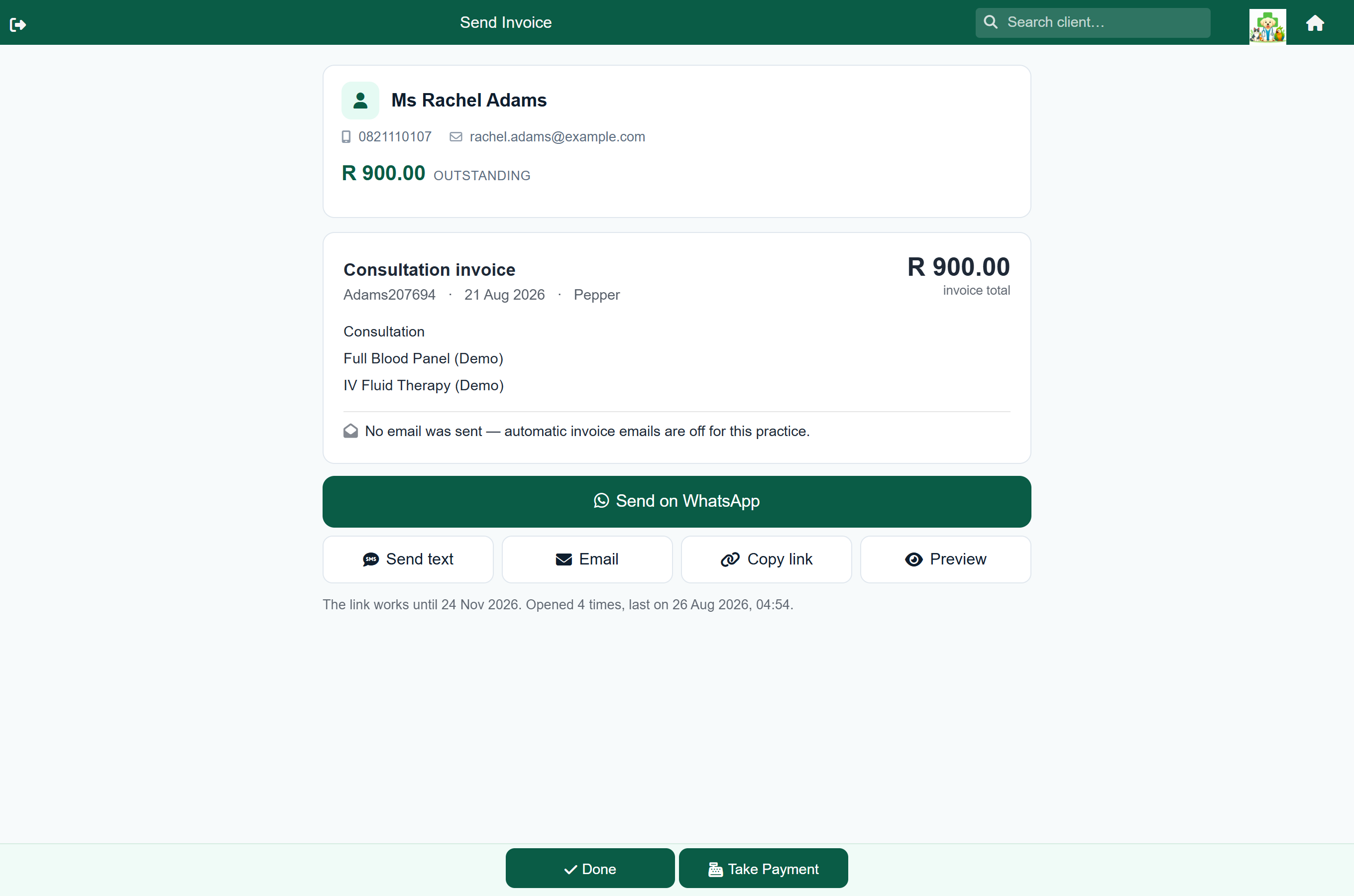
| Button | What it does |
|---|---|
| Send on WhatsApp | Opens WhatsApp with the client's chat and the message already written. Nothing is sent until you press send in WhatsApp. |
| Send text | Sends the same message as an SMS through your SMS account. Only appears if you have SMS set up. |
| Email / Email again | Emails the invoice. Reads Email again if it has already been emailed, and is hidden if the client has no email address on file. |
| Copy link | Copies the link, to paste wherever you like. |
| Preview | Opens the client's copy exactly as they will see it. |
Then press Done to carry on, or Take Payment to go straight to taking the money. You do not have to send anything.
What the screen tells you#
- The client and their account balance, including how overdue they are.
- What kind of invoice it is: Consultation, Sale, Hospital, Boarding or Grooming. A repeat handed over at the counter reads Medicine refill invoice.
- The invoice total: the same figure the client sees on the invoice and their statement.
- What it was for: the first few billed lines, and how many more there are.
- Whether it has already been emailed; see below.
Whether the client already has it#
A line on the screen says what happened to the invoice email:
| It says | What it means |
|---|---|
| Emailed to [email protected] | It has gone. |
| Emailing to [email protected] | It is on its way and goes out within a minute or two. This is normal just after finishing. |
| The email to [email protected] could not be delivered | It failed, usually a wrong address. Correct the address, and send by WhatsApp meanwhile. |
| No email was sent: automatic invoice emails are off | Your practice has that setting off. You can still send this one by hand. |
| No email was sent: this client has no email address on file | Send it by WhatsApp or text instead. |
| No emailed copy is recorded for this invoice | There is no record of an email, usually a zero-value or older invoice. |
How the payment queue knows it was sent#
Every way of sending from this screen is noted against the invoice, and the payment queue shows it: Sent: WhatsApp, SMS, Email or printed, with the time and who did it. An invoice that was emailed automatically counts as sent by email.
- Copy link shows as Link copied, not sent: the link may never have been pasted anywhere.
- Preview is not a send. It only shows you the client's copy.
- WhatsApp counts once you press the button, because FastVet cannot see whether you then pressed send in WhatsApp. It records what you did, not that the client read it.
- Sending an itemised account counts as sending every invoice on it.
Sending it again later#
Home›Search Client›the client›Statement
Every invoice on a client's account has a Share button, under the … button. It opens the same screen.
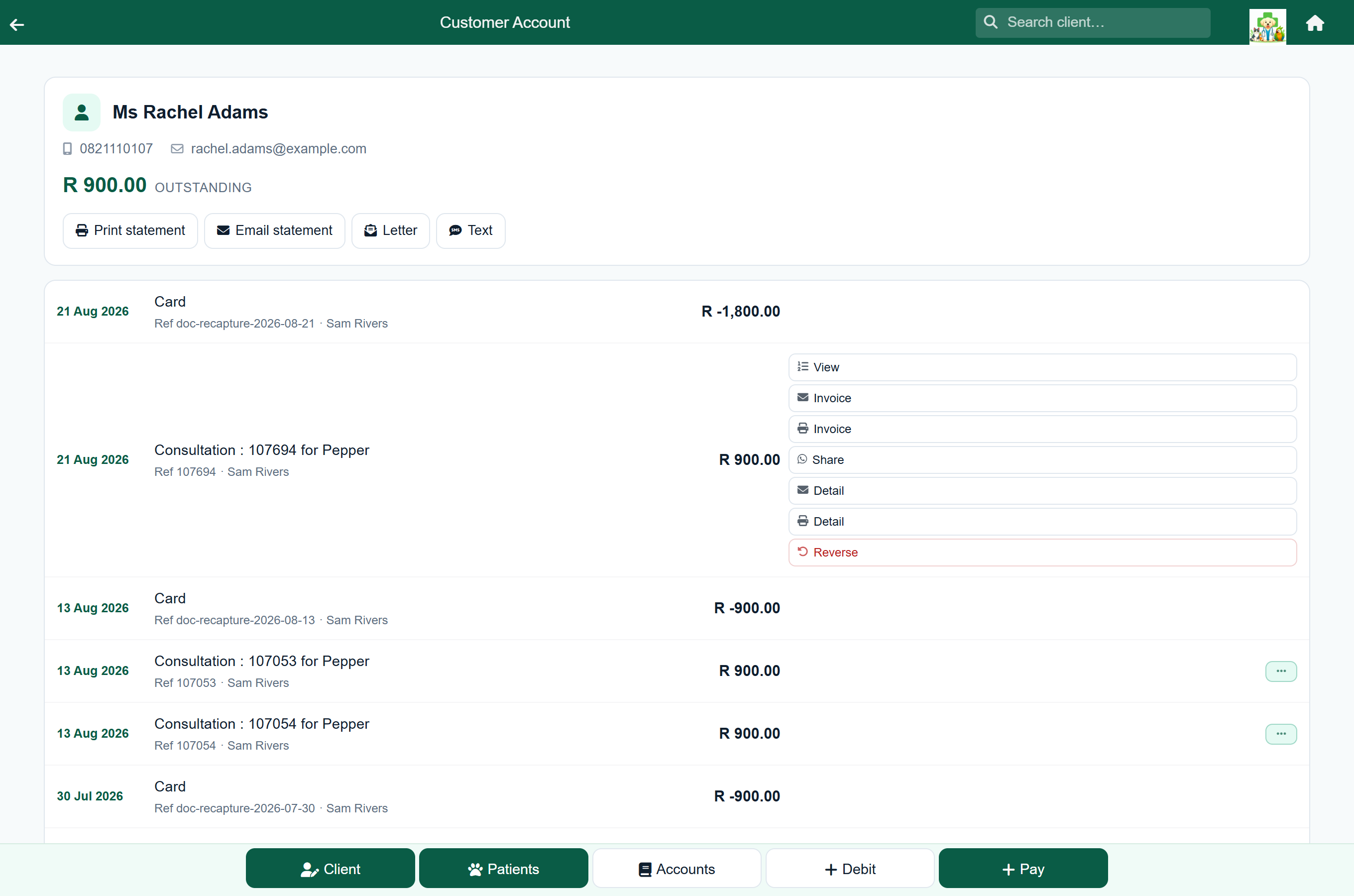
Sharing the same invoice again gives the client the same link. The screen shows whether they have opened it, how many times, and when they last did.
Getting the phone number right#
WhatsApp needs the client's number in international form: 2782 123 4567, not 082 123 4567. FastVet converts local numbers for you using your practice's dialling code, set under Settings → Integrations → SMS.
What the client sees#
A page with your practice name at the top, the invoice, and a Download PDF button. No login, nothing to install.
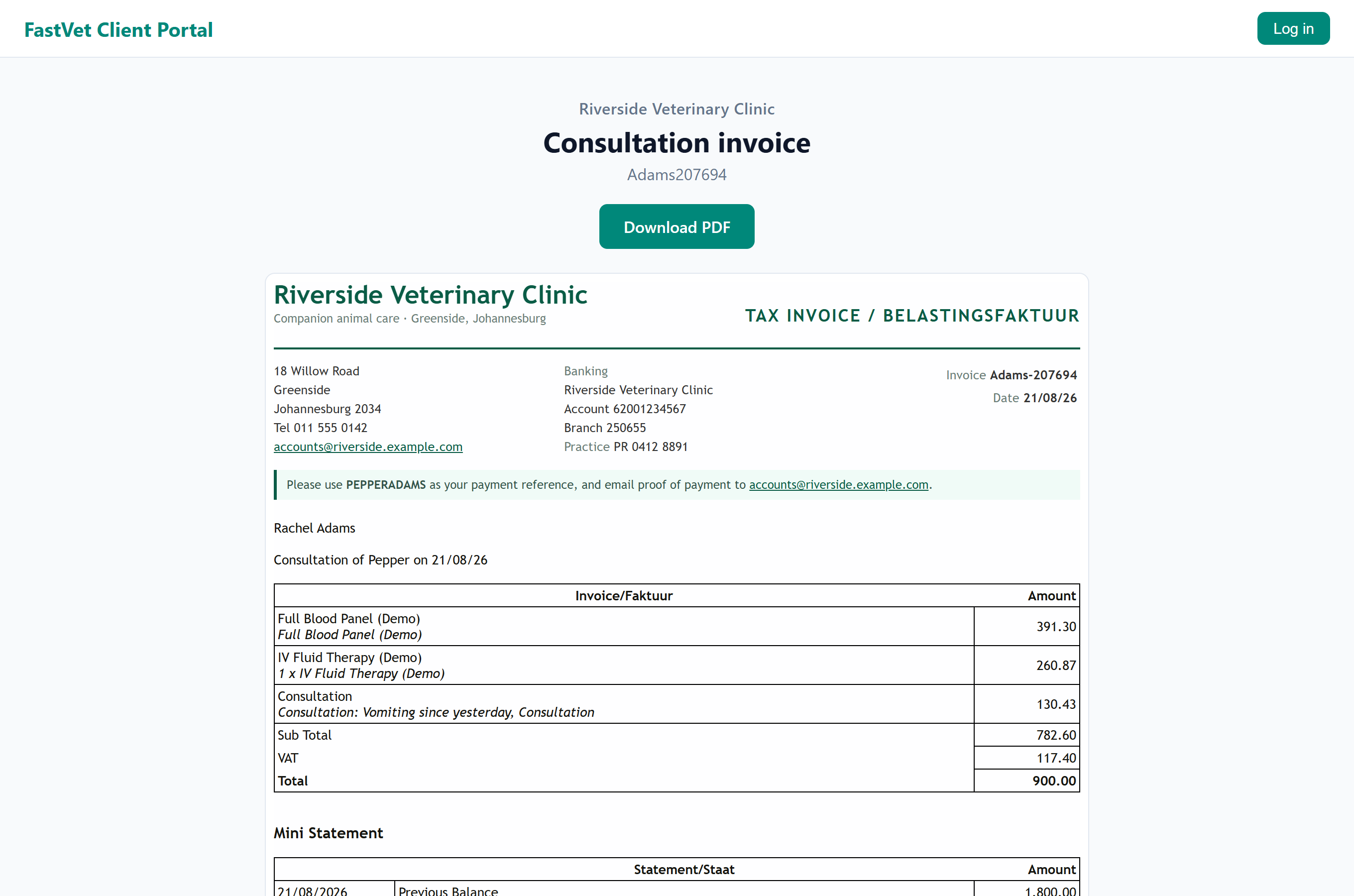
The invoice is kept exactly as it was the first time the client opened it, so it does not change if the work is later reversed and re-done. The page shows the date it was issued.
A line that was charged more than once says so, under the item: 28 x Trich Guard 50Dosis, or 2 Bottles x Ivermectin where the item is sold in a named unit. A line charged once prints its description alone. This reads the same on a consultation, a sale, a hospital stay and a boarding stay.
How private the link is#
The link contains a long random code that cannot be guessed or worked out from another link. It opens one invoice and nothing else: no account history, no other pets.
- It stops working 90 days after it is created. The screen shows the date.
- It is not indexed by search engines.
What can and cannot be sent this way#
Every finished invoice: consultations, sales, hospital stays, boarding stays and grooms. Estimates can be sent the same way.
Several invoices from one visit can go as one itemised account: from the client's account, or with Share itemised account on the payment queue. Its screen works like this one, and it can be emailed as well as sent by WhatsApp, text or link.
Statements cannot be sent as a link, because the balance changes with every payment. Send them by email or print. The itemised account can, because a sent copy dates its balance: it says Balance as at the day it was sent or first opened.