
Reminders
Set a reminder on the patient record during the visit, and FastVet contacts the client for you when it falls due - by email, by text message, or both. No spreadsheets, no third-party mail tool, nothing to remember.
Set it once, on the record
Create a reminder from a consultation or a hospital stay while you're already in the patient's record. Choose when it's due - a number of days, weeks or months out - and FastVet works out the date. The message is pre-filled with the patient's name and you can edit it to say exactly what you want. A reminder can be aimed at the client, or set as a private note-to-self that emails the responsible staff member instead.
- Due date set in days, weeks or months - no date arithmetic.
- Message pre-filled with the pet's name, fully editable.
- Aim it at the client, or at yourself as a follow-up prompt.
Sent automatically when due
FastVet checks for due reminders around the clock and contacts the client when the date arrives - each reminder sent exactly once. Emails carry your practice's own branded header, so they look like they came from you. Email and text are separate per-practice switches: leave them on and due reminders go out for you; turn them off and reminders simply wait on your follow-up list to send by hand.
- Your branded header on every reminder email.
- Independent switches for email and text - run either, or both.
- Reminders for a patient marked deceased are cancelled automatically.
Reach them by text as well
Email is easy to miss. Switch on text reminders and the same reminder goes out as an SMS - the message the vet typed is the text, with your practice name and phone number after it, so the client reads exactly what the vet meant. Two more switches cover the messages clients most want: a text appointment reminder the day before a booking, and a text for an overdue account on the same daily run that emails statements.
Staff can text by hand too - a message straight from a client's record when their medication is in or the clinic is running late, and a Text Owner action on any hospital or boarding stay for a progress update or a "ready to collect". You see what each message will cost in credits before you send it.
- Reminders, appointment reminders and overdue accounts, all by SMS.
- Text an owner directly from the client record or an in-patient stay.
- Wording for every automatic text is yours to edit, in one place.
- Sends through your own SMS account - SMS Portal or Twilio - with your live balance on screen.
Work the follow-up list
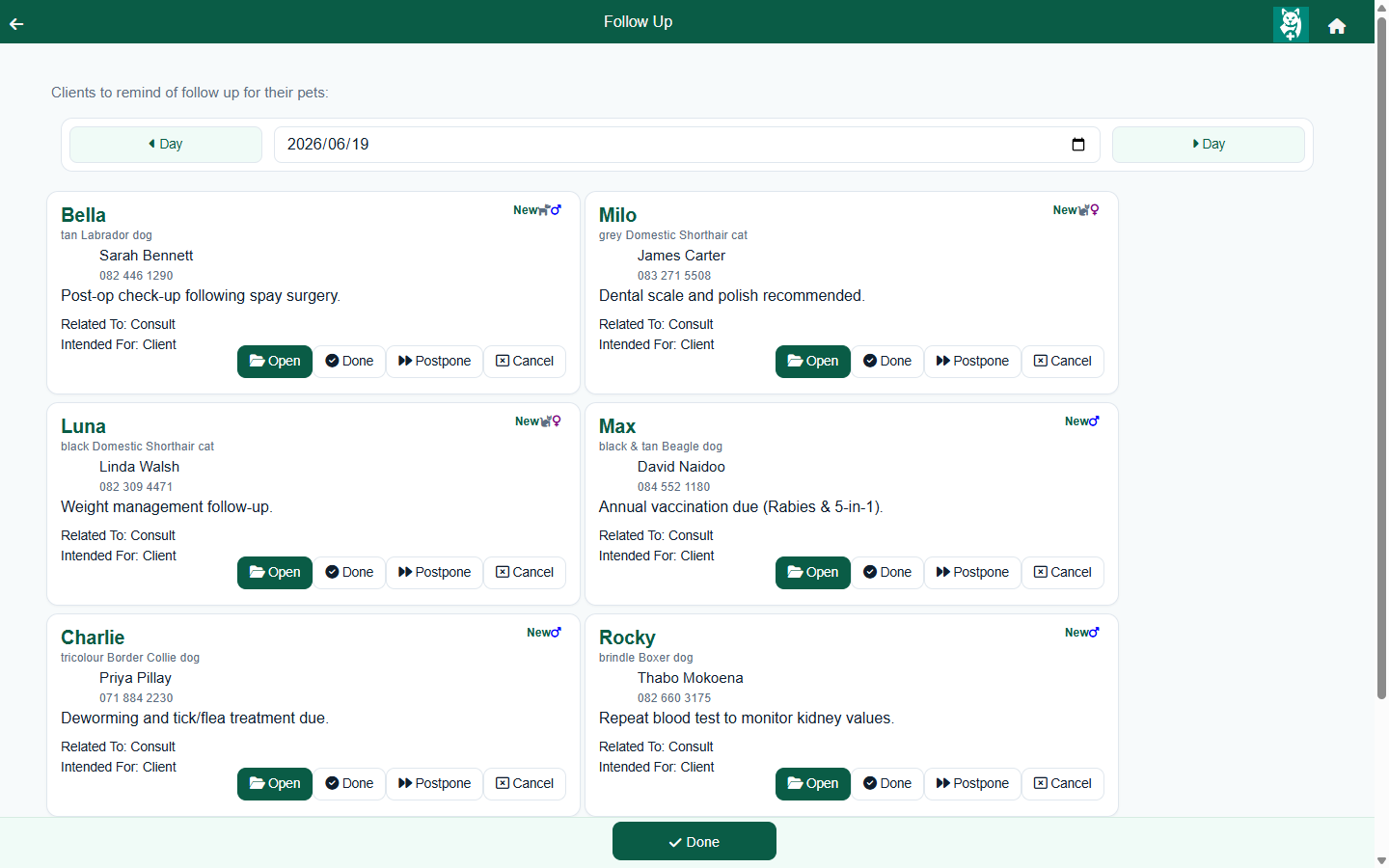
The follow-up screen is a daily work list of clients due for a reminder. Pick a date and see who's due, with the owner's name and contact details to hand. Mark each one done, cancel it, or postpone it to a new date with a reason - or jump straight into the patient's consultation from the same row.
Frequently asked questions
Are reminders sent automatically?
Yes. Once you set a reminder with a due date, FastVet checks for due reminders regularly and contacts the client for you when the date arrives - by email, by text message, or both. Each reminder is sent once.
Can I turn automated reminders off?
Yes. Email reminders and text reminders are separate per-practice switches, and each is off until you turn it on. With both off, reminders still appear on your follow-up work list to action by hand.
Does FastVet send SMS reminders?
Yes. Switch on text reminders and FastVet sends the reminder as an SMS as well as, or instead of, the email. The message the vet typed is the text, followed by your practice name and phone number. WhatsApp is not a channel today.
Do I need my own SMS account?
Yes. FastVet sends text messages through your choice of SMS Portal, a South African bulk-SMS provider, or Twilio, which covers most countries worldwide. The account is yours - you connect one of them in Settings (one at a time, and you can switch), and your live balance is shown in FastVet. The text options only appear once an SMS account is connected.
Are clients reminded about their appointments?
Yes, by text. Switch on text appointment reminders and FastVet texts each client the day before their appointment.
What happens if a pet has passed away?
A reminder for a patient marked as deceased is cancelled automatically, so grieving owners don't receive a reminder in error.